
![[CCNA] Шпаргалка по командам Cisco](https://bookflow.ru/wp-content/uploads/2021/09/CCNA-SHpargalka-po-komandam-Cisco-696x458.jpeg "[CCNA] Шпаргалка по командам Cisco")
Содержание

[CCNA] Cisco Commands Cheat Sheet
Router Modes:
- Router>: User mode = Limited to basic monitoring commands
- Router#: Privileged mode (exec-level mode) = Provides access to all other router commands
- Router(config)#: global configuration mode = Commands that affect the entire system
- Router(config-if)#: interface mode = Commands that affect interfaces
- Router(config-subif)#: subinterface mode = Commands that affect subinterfaces
- Router(config-line)#: line mode = Commands that affect in lines modes (console, vty, aux…)
- Router(config-router)#: router configuration mode
Changing switch hostname:
|
1 |
|
Configuring passwords:
|
1 2 |
|
Securing console port:
|
1 2 3 |
|
Securing terminal lines:
|
1 2 3 |
|
Encrypting passwords:
|
1 |
|
Configuring banners:
|
1 2 3 4 5 |
|
Giving the switch an IP address:
|
1 2 3 |
|
Setting the default gateway:
|
1 |
|
Saving configuration:
|
1 2 3 4 5 6 7 8 9 |
|
Working environment:
name lookup, history, exec-timeout and logging behavior…, also valid for line con 0.
|
1 2 3 4 5 |
|
Configuring switch to use SSH:
- Configure DNS domain name:
|
1 |
|
- Configure a username and password:
|
1 |
|
- Generate encryption keys:
The size of the key modulus in the range of 360 to 2048
|
1 2 |
|
- Define SSH version to use:
|
1 |
|
- Enable vty lines to use SSH:
|
1 2 3 4 |
|
Aliases:
Used to create shortcuts for long commands.
|
1 2 3 |
|
Description, speed and duplex:
|
1 2 3 4 5 6 |
|
Verify Basic Configuration:
- Shows information about the switch and its interfaces, RAM, NVRAM, flash, IOS, etc.
- Shows the current configuration file stored in DRAM.
- Shows the configuration file stored in NVRAM which is used at first boot process.
- Lists the commands currently held in the history buffer.
- Shows an overview of all interfaces, their physical status, protocol status and ip address if assigned.
|
1 |
|
- Shows detailed information about the specified interface, its status, protocol, duplex, speed, encapsulation, last 5 min traffic.
|
1 |
|
- Shows the description of all interfaces
|
1 |
|
- Shows the status of all interfaces like connected or not, speed, duplex, trunk or access vlan.
|
1 |
|
- Shows the public encryption key used for SSH.
|
1 |
|
- Shows information about the leased IP address (when an interface is configured to get IP address via a dhcp server)
Configuring port security:
- Make the switch interface as access port:
|
1 |
|
- Enable port security on the interface:
|
1 |
|
- Specify the maximum number of allowed MAC addresses:
|
1 |
|
- Define the action to take when violation occurs:
|
1 |
|
- Specify the allowed MAC addresses:
The sticky keyword is used to let the interface dynamically learns and configures the MAC addresses of the currently connected hosts.
|
1 |
|
Verify and troubleshoot port security:
- Shows the entries of the mac address table:
|
1 |
|
- Overview of port security of all interfaces:
- Shows detailed information about port security on the specified interface:
|
1 |
|
Configuring VLANs:
- Create a new VLAN and give it a name:
|
1 2 |
|
- Assign an access interface to access a specific VLAN:
|
1 2 3 |
|
Configuring an auxiliary VLAN for cisco IP phones:
|
1 2 3 4 |
|
Configuring Trunks:
|
1 2 3 |
|
Securing VLANs and Trunking:
- Administratively disable unused interfaces:
- Prevent trunking by disabling auto negotiation on the interface:
|
1 2 |
|
- Assign the port to an unused VLAN:
|
1 |
|
Configuring VTP:
- Configure VTP mode:
The transparent VTP mode is used when an engineer wants to deactivate VTP on a particular switch
|
1 |
|
- Configure VTP domain name:
|
1 |
|
- Configure VTP password (optional):
|
1 |
|
- Configure VTP pruning (optional):
|
1 |
|
- Enable VTP version 2 (optional):
|
1 |
|
Verify and troubleshoot VLANs and VTP:
- Lists information about administrative setting and operation status of interface:
|
1 |
|
- Lists all the trunk ports on a switch including the trunk allowed VLANs:
|
1 |
|
- Lists information about the VLANs:
|
1 |
|
- Lists VTP configuration (mode, domain-name, version, etc) and revision number:
- Shows the VTP password:
STP optimization:
- Hard coding the root bridge (changing bridge priority):
|
1 2 3 4 |
|
- Changing the STP mode:
|
1 |
|
- Enabling portfast and BPDU guard on an interface:
Portfast and BPDU guard are enabled only on interfaces connected to end user hosts
|
1 2 |
|
- Changing port cost:
|
1 |
|
- Bundling interfaces into an etherchannel:
|
1 |
|
STP verification and troubleshooting:
- Shows detailed info about STP state:
- Shows STP info only on a specific port:
|
1 |
|
- Shows STP info only for a specific VLAN:
|
1 |
|
- Shows info about the root switch:
|
1 |
|
- Shows info about the local switch:
|
1 |
|
- Show the state of the etherchannels:
- Provides informational messages about the changes in the STP topology:
|
1 |
|
Enabling or disabling CDP:
- Enabling CDP globally on a switch:
- Disabling CDP on a given interface:
|
1 |
|
Using CDP for network verification and troubleshooting:
- Shows global information about CDP itself:
- Shows information about CDP on a specific interface:
|
1 |
|
- Shows information about the directly connected cisco devices including interfaces names capabilities:
- Shows detailed information about the neighboring cisco devices including device address and version of IOS they run:
|
1 2 3 |
|
- Shows detailed information about the specified entry only:
Router basic configuration:
This section includes IOS commands that are absolutely identical on both routers and switches, except the part of line aux 0 which is configured only on router because switches do not have an auxiliary port.
|
1 2 3 4 5 6 7 8 9 10 11 12 13 14 15 16 17 18 19 20 21 22 23 24 25 26 27 28 29 30 31 32 33 34 35 36 37 38 |
|
Configuring router interfaces:
Clock rate is set only on the DCE side, typically the ISP side. On your router which is DTE you don’t need to set clocking.
|
1 2 3 4 5 6 7 8 9 10 |
|
Configuring Router-On-Stick for vlan routing:
|
1 2 3 4 5 6 7 8 |
|
Static route:
- Using next hop:
|
1 |
|
- Using exit interface:
|
1 2 |
|
Default Route:
|
1 |
|
RIPv2 Configuration:
|
1 2 3 4 5 |
|
RIPv2 Verification:
- Shows information about the running routing protocol process:
- Shows the entire routing table:
- Shows routes learned via RIP only:
- Shows detailed information about the route to the specified destination network:
|
1 |
|
OSPF Configuration:
- Enter OSPF router configuration mode:
|
1 |
|
- Configure one or more network commands to identify which interfaces will run OSPF:
|
1 2 3 |
|
- Configure router ID either (Optional):
Using router-id ospf subcommand:
|
1 |
|
Configuring an IP address on a loopback interface:
|
1 2 |
|
- Change Hello and Dead intervals per interface (Optional):
|
1 2 |
|
- Impact routing choices by tuning interface cost using one of the following ways (Optional):
Changing interface cost:
|
1 |
|
Changing interface bandwidth:
|
1 |
|
Changing the reference bandwidth that used by OSPF to calculate the cost:
|
1 |
|
- Disabling OSPF on a certain interface (Optional):
|
1 |
|
- Configuring OSPF authentication (Optional):
Type 0 authentication (none):
|
1 |
|
Type 1 authentication (clear text):
|
1 2 |
|
Type 2 authentication (md5):
|
1 2 |
|
- Configure maximum equal-cost paths (Optional):
|
1 |
|
OSPF verification:
- Shows information about the running routing protocol process:
- Shows the entire routing table:
- Shows routes learned via OSPF only:
- Shows all neighboring routers along with their respective adjacency state:
|
1 |
|
- Shows all the information contained in the LSDB:
|
1 |
|
- Shows detailed information about OSPF running on a specific interface:
|
1 |
|
EIGRP Configuration:
- Enter EIGRP configuration mode and define AS number:
|
1 |
|
- Configure one or more network commands to enable EIGRP on the specified interfaces:
|
1 2 3 4 |
|
- Disable auto summarization (Optional):
|
1 |
|
- Disable EIGRP on a specific interface (Optional):
|
1 |
|
- Configure load balancing parameters (Optional):
|
1 2 |
|
- Change interface Hello and Hold timers (Optional):
|
1 2 |
|
- Impacting metric calculations by tuning BW and delay of the interface (Optional):
|
1 2 |
|
EIGRP Authentication:
The key-string value and the mode must be the same on both routers. Lifetime options of the keys requires the clock of the routers to be set correctly, better use NTP, or it can cause problems
- Create an authentication key chain as follows:
Create a key chain and give it a name:
|
1 |
|
Create one or more keys giving them numbers:
|
1 |
|
Define the key value:
|
1 |
|
Define the life time of the keys (optional):
|
1 2 |
|
- Enable md5 authentication mode for EIGRP on the interface:
|
1 |
|
- Refer to the correct key chain to be used on the interface:
|
1 |
|
EIGRP Verification:
- Shows routes learned via EIGRP only:
- Shows EIGRP neighbors and status:
|
1 |
|
- Shows EIGRP topology table, including successor and feasible successor:
|
1 |
|
- Shows interfaces that run EIGRP:
|
1 |
|
- Lists statistics on numbers of EIGRP messages sent and received by the router:
|
1 |
|
Access Control Lists:
Standard ACL: 1 – 99 and 1300 – 1999
- Use a remark to describe the ACL (Optional):
|
1 |
|
- Create the ACL, keeping the following in mind:
- ACL uses first-match logic.
- There is an implicit deny anyat the end of the ACL.
|
1 2 3 4 5 |
|
- Enable the ACL on the chosen router interface in the correct direction (in or out):
|
1 |
|
- Using standard ACL to limit telnet and SSH access to a router:
Create the ACL that defines the permitted telnet clients:
|
1 2 |
|
Apply the ACL inbound the vty lines
|
1 2 |
|
Extended ACL: 100 – 199 and 2000 – 2699
- Extended ACL should be placed as close as possible to the source of the packet.
- Extended ACL matches packets based on source & des.IP addresses, protocol, source & des. Port numbers andother criteria as well
|
1 2 3 4 5 6 7 8 9 |
|
Named ACL:
- Named ACLs use names to identify ACLs rather than numbers, and commands that permit or deny traffic are written in a sub mode called named ACL mode (nacl).
- Named ACL enables the editing of the ACL (deleting or inserting statements) by sequencing statements of the ACL.
- Named standard ACL:
|
1 2 3 4 5 6 |
|
- Named extended ACL:
|
1 2 3 4 5 6 |
|
- Editing ACL using sequence numbers:
|
1 2 3 4 |
|
Verifying ACLs:
- Shows all ACLs configured on a router with counters at the end of each statement:
|
1 2 3 |
|
- Shows only the specified ACL:
|
1 |
|
- Includes a reference to the ACLs enabled on that interface either in or out:
|
1 |
|
DHCP Server
- Define a DHCP pool and give it a name:
|
1 |
|
- Define network and mask to use in this pool and the default gateway:
|
1 2 |
|
- Define one or more DNS server (OPTIONAL):
|
1 |
|
- Confine the lease time (OPTIONAL):
|
1 |
|
- Define one or more scopes of excluded (reserved) addresses (OPTIONAL):
|
1 2 |
|
DHCP Verification and Troubleshooting:
- Shows the status of the specified pool and the leased addresses from that pool:
|
1 |
|
- Shows all the leased ip addresses from all configured DHCP pools:
- Shows any conflicts that occurred:
|
1 |
|
PPP Configuration:
|
1 2 |
|
PPP Authentication:
CHAP:
- Configure the hostname:
|
1 |
|
- Configure the name of the other end router and the shared password:
|
1 2 |
|
- Enable CHAP authentication on the interface:
|
1 2 |
|
PAP:
- Configure the hostname:
|
1 |
|
- Configure the name of the other end router and the shared password:
|
1 |
|
- Enable PAP authentication on the interface and define the username and password to be sent by PAP:
|
1 2 3 |
|
PPP Verification and troubleshoot:
- Shows the encapsulation type and the control protocols of PPP:
- Useful for viewing the configuration of usernames and passwords used to authenticate PPP:
- Displays the authentication process of PPP in real time:
|
1 |
|
Frame Relay:
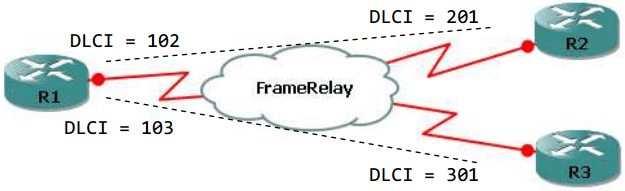
Multipoint (one subnet)
- Give the interface an ip address and enable Frame Relay encapsulation:
|
1 2 3 |
|
- Configure LMI signaling type: (Optional as discussed with ISP):
|
1 |
|
- Configure Frame Relay mapping:
|
1 2 3 4 5 6 7 8 9 10 11 12 |
|
Point-to-point (different subnets; one subnet per subinterface)
- Enable Frame Relay encapsulation:
|
1 2 |
|
- Give an ip address to a subinterface and configure its DLCI:
|
1 2 3 4 5 6 7 8 9 10 11 12 13 14 15 16 |
|
Frame Relay Verification and troubleshoot:
- Shows the encapsulation type:
|
1 |
|
- Lists PVC status information:
- Lists DLCI to IP mapping:
- Lists LMI status information:
- Displays the content of LMI messages:
|
1 |
|
- Lists messages about certain Frame Relay events, including Inverse ARP messaeges:
|
1 |
|
Network Address Translation (NAT):
Static NAT:
- Define the outside and inside interfaces:
|
1 2 3 4 |
|
- Configure static NAT statement:
|
1 |
|
Dynamic NAT:
- Define the outside and inside interfaces
- Create an ACL that determines the IP addresses thatare allowed to be translated:
|
1 |
|
- Create a pool of public IP addresses:
|
1 |
|
- Configure NAT statement:
|
1 2 3 4 5 6 7 8 |
|
NAT verification and troubleshoot:
- Useful in viewing the configuration of NAT pool and the inside and outside interfaces:
- Displays access lists, including the one used for NAT:
- Shows counters for packets and NAT table entries, as well as basic configuration information:
|
1 |
|
- Displays the NAT table:
|
1 |
|
- Clears all the dynamic entries in the NAT table:
|
1 |
|
- Issues a log message describing each packet whose ip address is translated with NAT:
Table Of Contents
Basic Router Configuration
Interface Port Labels
Viewing the Default Configuration
Information Needed for Configuration
Configuring Basic Parameters
Configure Global Parameters
Configure Fast Ethernet LAN Interfaces
Configure WAN Interfaces
Configure the Fast Ethernet WAN Interface
Configure the ATM WAN Interface
Configure the Wireless Interface
Configuring a Loopback Interface
Configuration Example
Verifying Your Configuration
Configuring Command-Line Access to the Router
Configuration Example
Configuring Static Routes
Configuration Example
Verifying Your Configuration
Configuring Dynamic Routes
Configuring RIP
Configuration Example
Verifying Your Configuration
Configuring Enhanced IGRP
Configuration Example
Verifying Your Configuration
Basic Router Configuration
This chapter provides procedures for configuring the basic parameters of your Cisco router, including global parameter settings, routing protocols, interfaces, and command-line access. It also describes the default configuration on startup.

Note  Individual router models may not support every feature described throughout this guide. Features not supported by a particular router are indicated whenever possible.
This chapter contains the following sections:
•Interface Port Labels
•Viewing the Default Configuration
•Information Needed for Configuration
•Configuring Basic Parameters
•Configuring Static Routes
•Configuring Dynamic Routes
•Configuring Enhanced IGRP
Each section includes a configuration example and verification steps, as available.
For complete information on how to access global configuration mode, see the «Entering Global Configuration Mode» section in Appendix A, «Cisco IOS Basic Skills.» For more information on the commands used in the following tables, see the Cisco IOS Release 12.3 documentation set.
Interface Port Labels
Table 1-1 lists the interfaces supported for each router and their associated port labels on the equipment.
|
Router |
Interface |
Port Label |
|---|---|---|
|
Cisco 851 |
Fast Ethernet LAN |
LAN (top), FE0-FE3 (bottom) |
|
Fast Ethernet WAN |
WAN (top), FE4 (bottom) |
|
|
Wireless LAN |
(no label) |
|
|
Cisco 871 |
Fast Ethernet LAN |
FE0-FE3 |
|
Fast Ethernet WAN |
FE4 |
|
|
Wireless LAN |
LEFT, RIGHT/PRIMARY |
|
|
USB |
1-0 |
|
|
Cisco 857 |
Fast Ethernet LAN |
LAN (top), FE0-FE3 (bottom) |
|
ATM WAN |
ADSLoPOTS |
|
|
Wireless LAN |
(no label) |
|
|
Cisco 876 |
Fast Ethernet LAN |
LAN (top), FE0-FE3 (bottom) |
|
ATM WAN |
ADSLoISDN |
|
|
Wireless LAN |
LEFT, RIGHT/PRIMARY |
|
|
BRI |
ISDN S/T |
|
|
Cisco 877 |
Fast Ethernet LAN |
LAN (top), FE0-FE3 (bottom) |
|
ATM WAN |
ADSLoPOTS |
|
|
Wireless LAN |
LEFT, RIGHT/PRIMARY |
|
|
Cisco 878 |
Fast Ethernet LAN |
FE0-FE3 |
|
ATM WAN |
G.SHDSL |
|
|
Wireless LAN |
LEFT, RIGHT/PRIMARY |
|
|
BRI |
ISDN S/T |
Viewing the Default Configuration
When you first boot up your Cisco router, some basic configuration has already been performed. All of the LAN and WAN interfaces have been created, console and VTY ports are configured, and the inside interface for Network Address Translation has been assigned. Use the show running-config command to view the initial configuration, as shown in Example 1-1.
Example 1-1 Cisco 851 Default Configuration on Startup
Router# show running-config
Building configuration...
Current configuration : 1090 bytes
service timestamps debug datetime msec
service timestamps log datetime msec
no service password-encryption
no ftp-server write-enable
speed basic-1.0 basic-2.0 basic-5.5 6.0 9.0 basic-11.0 12.0 18.0 24.0 36.0 48.0
Information Needed for Configuration
You need to gather some or all of the following information, depending on your planned network scenario, prior to configuring your network
•If you are setting up an Internet connection, gather the following information:
– Point-to-Point Protocol (PPP) client name that is assigned as your login name
–PPP authentication type: Challenge Handshake Authentication Protocol (CHAP) or Password Authentication Protocol (PAP)
–PPP password to access your Internet service provider (ISP) account
–DNS server IP address and default gateways
•If you are setting up a connection to a corporate network, you and the network administrator must generate and share the following information for the WAN interfaces of the routers:
–PPP authentication type: CHAP or PAP
–PPP client name to access the router
–PPP password to access the router
•If you are setting up IP routing:
–Generate the addressing scheme for your IP network.
–Determine the IP routing parameter information, including IP address, and ATM permanent virtual circuits (PVCs). These PVC parameters are typically virtual path identifier (VPI), virtual circuit identifier (VCI), and traffic shaping parameters.
–Determine the number of PVCs that your service provider has given you, along with their VPIs and VCIs.
–For each PVC determine the type of AAL5 encapsulation supported. It can be one of the following:
AAL5SNAP—This can be either routed RFC 1483 or bridged RFC 1483. For routed RFC 1483, the service provider must provide you with a static IP address. For bridged RFC 1483, you may use DHCP to obtain your IP address, or you may obtain a static IP address from your service provider.
AAL5MUX PPP—With this type of encapsulation, you need to determine the PPP-related configuration items.
•If you plan to connect over an ADSL or G.SHDSL line:
–Order the appropriate line from your public telephone service provider.
For ADSL lines—Ensure that the ADSL signaling type is DMT (also called ANSI T1.413) or DMT Issue 2.
For G.SHDSL lines—Verify that the G.SHDSL line conforms to the ITU G.991.2 standard and supports Annex A (North America) or Annex B (Europe).
Once you have collected the appropriate information, you can perform a full configuration on your router, beginning with the tasks in the «Configuring Basic Parameters» section.
Configuring Basic Parameters
To configure the router, perform one or more of these tasks:
•Configure Global Parameters
•Configure Fast Ethernet LAN Interfaces
•Configure WAN Interfaces
•Configuring a Loopback Interface
•Configuring Command-Line Access to the Router
A configuration example is presented with each task to show the network configuration following completion of that task.
Configure Global Parameters
Perform these steps to configure selected global parameters for your router:
|
Command |
Purpose |
|
|---|---|---|
|
Step 1 |
configure terminal Example: Router> enable Router# configure terminal Router(config)# |
Enters global configuration mode, when using the console port. If you are connecting to the router using a remote terminal, use the following: telnet router name or address Login: login id Password: ********* Router> enable |
|
Step 2 |
hostname name Example: Router(config)# hostname Router Router(config)# |
Specifies the name for the router. |
|
Step 3 |
enable secret password Example: Router(config)# enable secret cr1ny5ho Router(config)# |
Specifies an encrypted password to prevent unauthorized access to the router. |
|
Step 4 |
no ip domain-lookup Example: Router(config)# no ip domain-lookup |
Disables the router from translating unfamiliar words (typos) into IP addresses. |
For complete information on the global parameter commands, see the Cisco IOS Release 12.3 documentation set.
Configure Fast Ethernet LAN Interfaces
The Fast Ethernet LAN interfaces on your router are automatically configured as part of the default VLAN and as such, they are not configured with individual addresses. Access is afforded through the VLAN. You may assign the interfaces to other VLANs if desired. For more information about creating VLANs, see Chapter 5 «Configuring a LAN with DHCP and VLANs.»
Configure WAN Interfaces
The Cisco 851 and Cisco 871 routers each have one Fast Ethernet interface for WAN connection. The Cisco 857, Cisco 877, and Cisco 878 routers each have one ATM interface for WAN connection.
Based on the router model you have, configure the WAN interface(s) using one of the following procedures:
•Configure the Fast Ethernet WAN Interface
•Configure the ATM WAN Interface
Configure the Fast Ethernet WAN Interface
This procedure applies only to the Cisco 851 and Cisco 871 router models. Perform these steps to configure the Fast Ethernet interface, beginning in global configuration mode:
|
Command |
Purpose |
|
|---|---|---|
|
Step 1 |
interface type number Example: Router(config)# interface fastethernet 4
Router(config-int)# |
Enters the configuration mode for a Fast Ethernet WAN interface on the router. |
|
Step 2 |
ip address ip-address mask Example: Router(config-int)# ip address 192.168.12.2
255.255.255.0
Router(config-int)# |
Sets the IP address and subnet mask for the specified Fast Ethernet interface. |
|
Step 3 |
no shutdown Example: Router(config-int)# no shutdown
Router(config-int)# |
Enables the Ethernet interface, changing its state from administratively down to administratively up. |
|
Step 4 |
exit Example: Router(config-int)# exit
Router(config)# |
Exits configuration mode for the Fast Ethernet interface and returns to global configuration mode. |
Configure the ATM WAN Interface
This procedure applies only to the Cisco 857, Cisco 876, Cisco 877 and Cisco 878 models.
Perform these steps to configure the ATM interface, beginning in global configuration mode:
|
Command |
Purpose |
|
|---|---|---|
|
Step 1 |
For the Cisco 878 model only:
controller dsl 0 Example: Router(config)# controller dsl 0
Router(config-controller)# mode atm
Router(config-controller)# exit Router(config)# |
For routers using the G.SHDSL signaling, perform these commands. Ignore this step for routers using ADSL signaling. |
|
Step 2 |
interface type number Example: Router(config)# interface atm0
Router(config-int)# |
Identifies and enters the configuration mode for an ATM interface. |
|
Step 3 |
ip address ip-address mask Example: Router(config-int)# ip address 10.10.10.100
255.255.255.0
Router(config-int)# |
Sets the IP address and subnet mask for the ATM interface. |
|
Step 4 |
no shutdown Example: Router(config-int)# no shutdown
Router(config-int)# |
Enables the ATM 0 interface. |
|
Step 5 |
exit Example: Router(config-int)# exit
Router(config)# |
Exits configuration mode for the ATM interface and returns to global configuration mode. |
Configure the Wireless Interface
The wireless interface enables connection to the router through a wireless LAN connection. For more information about configuring a wireless connection, see Chapter 9 «Configuring a Wireless LAN Connection,» and the Cisco Access Router Wireless Configuration Guide.
Configuring a Loopback Interface
The loopback interface acts as a placeholder for the static IP address and provides default routing information.
For complete information on the loopback commands, see the Cisco IOS Release 12.3 documentation set.
Perform these steps to configure a loopback interface:
|
Command |
Purpose |
|
|---|---|---|
|
Step 1 |
interface type number Example: Router(config)# interface Loopback 0
Router(config-int)# |
Enters configuration mode for the loopback interface. |
|
Step 2 |
ip address ip-address mask Example: Router(config-int)# ip address 10.108.1.1
255.255.255.0
Router(config-int)# |
Sets the IP address and subnet mask for the loopback interface. |
|
Step 3 |
exit Example: Router(config-int)# exit
Router(config)# |
Exits configuration mode for the loopback interface and returns to global configuration mode. |
Configuration Example
The loopback interface in this sample configuration is used to support Network Address Translation (NAT) on the virtual-template interface. This configuration example shows the loopback interface configured on the Fast Ethernet interface with an IP address of 10.10.10.100/24, which acts as a static IP address. The loopback interface points back to virtual-template1, which has a negotiated IP address.
ip address 10.10.10.100 255.255.255.0 (static IP address)
interface Virtual-Template1
Verifying Your Configuration
To verify that you have properly configured the loopback interface, enter the show interface loopback command. You should see verification output similar to the following example.
Router# show interface loopback 0
Loopback0 is up, line protocol is up
Internet address is 10.10.10.100/24
MTU 1514 bytes, BW 8000000 Kbit, DLY 5000 usec,
reliability 255/255, txload 1/255, rxload 1/255
Encapsulation LOOPBACK, loopback not set
Last input never, output never, output hang never
Last clearing of "show interface" counters never
Output queue 0/0, 0 drops; input queue 0/75, 0 drops
5 minute input rate 0 bits/sec, 0 packets/sec
5 minute output rate 0 bits/sec, 0 packets/sec
0 packets input, 0 bytes, 0 no buffer
Received 0 broadcasts, 0 runts, 0 giants, 0 throttles
0 input errors, 0 CRC, 0 frame, 0 overrun, 0 ignored, 0 abort
0 packets output, 0 bytes, 0 underruns
0 output errors, 0 collisions, 0 interface resets
0 output buffer failures, 0 output buffers swapped out
Another way to verify the loopback interface is to ping it:
Router# ping 10.10.10.100
Type escape sequence to abort.
Sending 5, 100-byte ICMP Echos to 10.10.10.100, timeout is 2 seconds:
Success rate is 100 percent (5/5), round-trip min/avg/max = 1/2/4 ms
Configuring Command-Line Access to the Router
Perform these steps to configure parameters to control access to the router, beginning in global configuration mode.
|
Command |
Purpose |
|
|---|---|---|
|
Step 1 |
line [aux | console | tty | vty] line-number Example: Router(config)# line console 0
Router(config)# |
Enters line configuration mode, and specifies the type of line. This example specifies a console terminal for access. |
|
Step 2 |
password password Example: Router(config)# password 5dr4Hepw3
Router(config)# |
Specifies a unique password for the console terminal line. |
|
Step 3 |
login Example: Router(config)# login
Router(config)# |
Enables password checking at terminal session login. |
|
Step 4 |
exec-timeout minutes [seconds] Example: Router(config)# exec-timeout 5 30
Router(config)# |
Sets the interval that the EXEC command interpreter waits until user input is detected. The default is 10 minutes. Optionally, add seconds to the interval value. This example shows a timeout of 5 minutes and 30 seconds. Entering a timeout of 0 0 specifies never to time out. |
|
Step 5 |
line [aux | console | tty | vty] line-number Example: Router(config)# line vty 0 4
Router(config)# |
Specifies a virtual terminal for remote console access. |
|
Step 6 |
password password Example: Router(config)# password aldf2ad1
Router(config)# |
Specifies a unique password for the virtual terminal line. |
|
Step 7 |
login Example: Router(config)# login
Router(config)# |
Enables password checking at the virtual terminal session login. |
|
Step 8 |
end Example: Router(config)# end
Router# |
Exits line configuration mode, and returns to privileged EXEC mode. |
For complete information about the command line commands, see the Cisco IOS Release 12.3 documentation set.
Configuration Example
The following configuration shows the command-line access commands.
You do not need to input the commands marked «default.» These commands appear automatically in the configuration file generated when you use the show running-config command.
transport input none (default)
Configuring Static Routes
Static routes provide fixed routing paths through the network. They are manually configured on the router. If the network topology changes, the static route must be updated with a new route. Static routes are private routes unless they are redistributed by a routing protocol. Configuring static routes on the Cisco 850 and Cisco 870 series routers is optional.
Perform these steps to configure static routes, beginning in global configuration mode:
|
Command |
Purpose |
|
|---|---|---|
|
Step 1 |
ip route prefix mask {ip-address | interface-type interface-number [ip-address]} Example: Router(config)# ip route 192.168.1.0
255.255.0.0 10.10.10.2
Router(config)# |
Specifies the static route for the IP packets. For details about this command and additional parameters that can be set, see the Cisco IOS IP Command Reference, Volume 2 of 4: Routing Protocols. |
|
Step 2 |
end Example: Router(config)# end
Router# |
Exits router configuration mode, and enters privileged EXEC mode. |
For complete information on the static routing commands, see the Cisco IOS Release 12.3 documentation set. For more general information on static routing, see «Concepts.»
Configuration Example
In the following configuration example, the static route sends out all IP packets with a destination IP address of 192.168.1.0 and a subnet mask of 255.255.255.0 on the Fast Ethernet interface to another device with an IP address of 10.10.10.2. Specifically, the packets are sent to the configured PVC.
You do not need to enter the commands marked «(default).» These commands appear automatically in the configuration file generated when you use the show running-config command.
ip route 192.168.1.0 255.255.255.0 10.10.10.2!
Verifying Your Configuration
To verify that you have properly configured static routing, enter the show ip route command and look for static routes signified by the «S.»
You should see verification output similar to the following example.
Codes: C - connected, S - static, R - RIP, M - mobile, B - BGP
D - EIGRP, EX - EIGRP external, O - OSPF, IA - OSPF inter area
N1 - OSPF NSSA external type 1, N2 - OSPF NSSA external type 2
E1 - OSPF external type 1, E2 - OSPF external type 2
i - IS-IS, su - IS-IS summary, L1 - IS-IS level-1, L2 - IS-IS level-2
ia - IS-IS inter area, * - candidate default, U - per-user static route
o - ODR, P - periodic downloaded static route
Gateway of last resort is not set
10.0.0.0/24 is subnetted, 1 subnets
C 10.108.1.0 is directly connected, Loopback0
S* 0.0.0.0/0 is directly connected, FastEthernet0
Configuring Dynamic Routes
In dynamic routing, the network protocol adjusts the path automatically, based on network traffic or topology. Changes in dynamic routes are shared with other routers in the network.
The Cisco routers can use IP routing protocols, such as Routing Information Protocol (RIP) or Enhanced Interior Gateway Routing Protocol (EIGRP), to learn routes dynamically. You can configure either of these routing protocols on your router.
Configuring RIP
Perform these steps to configure the RIP routing protocol on the router, beginning in global configuration mode:
|
Command |
Task |
|
|---|---|---|
|
Step 1 |
router rip Example: Router> configure terminal
Router(config)# router rip
Router(config-router)# |
Enters router configuration mode, and enables RIP on the router. |
|
Step 2 |
version {1 | 2} Example: Router(config-router)# version 2
Router(config-router)# |
Specifies use of RIP version 1 or 2. |
|
Step 3 |
network ip-address Example: Router(config-router)# network 192.168.1.1
Router(config-router)# network 10.10.7.1
Router(config-router)# |
Specifies a list of networks on which RIP is to be applied, using the address of the network of directly connected networks. |
|
Step 4 |
no auto-summary Example: Router(config-router)# no auto-summary
Router(config-router)# |
Disables automatic summarization of subnet routes into network-level routes. This allows subprefix routing information to pass across classful network boundaries. |
|
Step 5 |
end Example: Router(config-router)# end
Router# |
Exits router configuration mode, and enters privileged EXEC mode. |
For complete information on the dynamic routing commands, see the Cisco IOS Release 12.3 documentation set. For more general information on RIP, see «Concepts.»
Configuration Example
The following configuration example shows RIP version 2 enabled in IP network 10.0.0.0 and 192.168.1.0.
Execute the show running-config command from privileged EXEC mode to see this configuration.
Verifying Your Configuration
To verify that you have properly configured RIP, enter the show ip route command and look for RIP routes signified by «R.» You should see a verification output like the example shown below.
Codes: C - connected, S - static, R - RIP, M - mobile, B - BGP
D - EIGRP, EX - EIGRP external, O - OSPF, IA - OSPF inter area
N1 - OSPF NSSA external type 1, N2 - OSPF NSSA external type 2
E1 - OSPF external type 1, E2 - OSPF external type 2
i - IS-IS, su - IS-IS summary, L1 - IS-IS level-1, L2 - IS-IS level-2
ia - IS-IS inter area, * - candidate default, U - per-user static route
o - ODR, P - periodic downloaded static route
Gateway of last resort is not set
10.0.0.0/24 is subnetted, 1 subnets
C 10.108.1.0 is directly connected, Loopback0
R 3.0.0.0/8 [120/1] via 2.2.2.1, 00:00:02, Ethernet0/0
Configuring Enhanced IGRP
Perform these steps to configure Enhanced IGRP (EIGRP), beginning in global configuration mode:
|
Command |
Purpose |
|
|---|---|---|
|
Step 1 |
router eigrp as-number Example: Router(config)# router eigrp 109
Router(config)# |
Enters router configuration mode, and enables EIGRP on the router. The autonomous-system number identifies the route to other EIGRP routers and is used to tag the EIGRP information. |
|
Step 2 |
network ip-address Example: Router(config)# network 192.145.1.0
Router(config)# network 10.10.12.115
Router(config)# |
Specifies a list of networks on which EIGRP is to be applied, using the IP address of the network of directly connected networks. |
|
Step 3 |
end Example: Router(config-router)# end
Router# |
Exits router configuration mode, and enters privileged EXEC mode. |
For complete information on the IP EIGRP commands, see the Cisco IOS Release 12.3 documentation set. For more general information on EIGRP concepts, see «Concepts.»
Configuration Example
The following configuration example shows the EIGRP routing protocol enabled in IP networks 192.145.1.0 and 10.10.12.115. The EIGRP autonomous system number is 109.
Execute the show running-config command from privileged EXEC mode to see this configuration.
Verifying Your Configuration
To verify that you have properly configured IP EIGRP, enter the show ip route command, and look for EIGRP routes indicated by «D.» You should see verification output similar to the following example.
Codes: C - connected, S - static, R - RIP, M - mobile, B - BGP
D - EIGRP, EX - EIGRP external, O - OSPF, IA - OSPF inter area
N1 - OSPF NSSA external type 1, N2 - OSPF NSSA external type 2
E1 - OSPF external type 1, E2 - OSPF external type 2
i - IS-IS, su - IS-IS summary, L1 - IS-IS level-1, L2 - IS-IS level-2
ia - IS-IS inter area, * - candidate default, U - per-user static route
o - ODR, P - periodic downloaded static route
Gateway of last resort is not set
10.0.0.0/24 is subnetted, 1 subnets
C 10.108.1.0 is directly connected, Loopback0
D 3.0.0.0/8 [90/409600] via 2.2.2.1, 00:00:02, Ethernet0/0
 |
�����: ������ �����
, ��������� �������, Cisco Systems
����� ���� � �����: http://www.banknet.kz/~info/
����������:
1. ��������
��������������� Cisco2511 � Cisco1600
2. ������ ������ � ��������������� Cisco
2.1 ����������� � �������������� � ������ ������
2.2 �������������� �������� enable secret password
3. ������ � ����-������� � NVRAM
4. ��������� ���������� ����������� Serial ��� X25
5. AAA (authentication, authorization, accounting), tacacs+, RADIUS
6. ��������� ������������ ���������� � �����
7. ���������� � ����������
1.
�������� ��������������� Cisco2511 � Cisco1600
�������������
Cisco 1601
��������������
����� Cisco 1601 ������ ��� ����������� ��������� ������, � ������� ����������
��������� ���� Ethernet, � Internet � � ���������� ���� ��������, ��� � �������������
��������� ���� ����� ��������� ����������� ���������� �����, ����� ��� ISDN,
����������� ���������������� � ���������� ����������������.
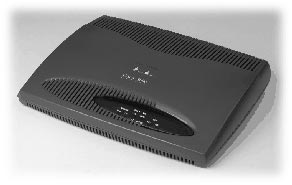
Cisco 1601 �����
���� Ethernet-����, ���� ���������� WAN-���� � ���� ���� ��� ���������������
������� WAN-�����.
���� ���
������������� ������ ��������� ����������� �������� ��� ��� �������� �ݣ ����
���� �� �������������, � ������ ��������� ������������ ��� ��� �� ������ ��������-�����������
����� �����. ������� ����� ��������������� Cisco 1600 ���������� ����� �������
�������� �� ��������� � ������� ���������� ����� �� ������. ����������������
���� �� ������ 1601 � ������������ ����� ����� �������� � ��������� �������:
- �����������
�� ���������� �� 115.2 ��/� �� ������������� ���������� ����� (��������� PPP,
SLIP) - ����������
�� ���������� �� 2.048 ��/� �� ���������� ����� (��������� Frame Relay, SMDS,
X.25, HDLC, LAPB, PPP)
Cisco 1601: ���
�����

��������������
Cisco 2500
��������������
����� Cisco 2509 �������������� ��� ��� ������������� � ��������� �����, ���
� � ����� � ���������� ������.
������
�������� ����� �� ��������� �����������:
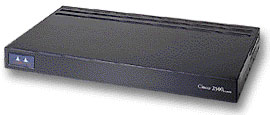
- 1 Ethernet
- 2 ����������
���������������� - 8 �����������
����������������
��������������
����� Cisco 2500 �������� Flash-������� ���������� EPROM, ������� �����������
��� �������� ����������� ������� � ������������ �� ������ ������������.
��� ������� ����� �������� � �������������� ������������ ����������� (feature
set) ������������ ������� Cisco IOS, ������� �������� ����� ������� ��������
��������, ��������������� ���������� ����������, ����������� � ��� ����. �����������
��������� ����� ����� ������� ������ — �� ������� IP � �������� ���������� ��
������� ������ �������������� ������������ �� ����� Cisco, ������� APPN � RMON.
��� ������, �� ����������� ��������������� � ��������������, ����� AUI ���ߣ�
Ethernet-������. ���������� ����� ����� ������������� DB-60 ������, � ��� �����
������������ ������������ ������� (V.35, RS-232, � �.�.). ����������� �����
�� �������� ������� ������� �� 8 ������ � 68 ���������� ���ߣ��. �� �������
����� ������� ������������ ���� � ���ߣ��� RJ-45, � ����� ���� AUX, �������
����� ������������ ���� ��� ���̣����� ���������� ���������������, ���� ���
����������� ���� ��� ��������� ����� �����.
Cisco 2511: ���
�����
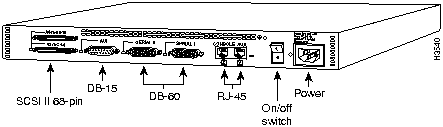
2.
������ ������ � ��������������� Cisco
�������� �������,
���������� �������� (��� PC � TELEMATE) � ����������� ����� (��� ���������������
���� ����� ������������������ Cisco, � ������� �������� ��������), ��� ������
��� ������ (����������, Ethernet, ������), �������� ������� � �������� ����������������.
��� ������ ��������� IOS �������� ������� ������������ �� ���������� ���� —
����� ��������� ��������� �����, ����� ���� �� ������, ��� �� ��� ����� ������
���, ��� �������� ����������� ���������� ������. �������� �������, IOS ����������
��������� ������� setup — ������������. � ���� ������ IOS ������ ��� ���������
�������� � �������������� ���������������. ����� ����� ����� ����� � ���������
������������, ��� �� ���������. ������� setup ����� ��������� � ����� ������
� ��������� ������ � ����������������� ������:
Router#setup
����������������
�������������� ���������� ���������:
1. ���������
���������:
telnet Router — ��� Cisco
���-Cisco>
���������: conf term
NVRAM: conf memory
�� ����: conf network
2. ����� WWW
(������� � ������ 11.0(6), 11.1(5), �� ��� �����������, � ������ 12.0 — ���
�����������): ip http server
3. ClickStart
(���������������� Cisco 1003, 1004 � 1005).
����� ��������
� ��������� �����:
1. help — � �����
������ ����� ������ «?» — ����� � ����� ������ ������ ������ ��� ���������.
2. ����� �������� ����� ��� ��� ����� ��������� �� ���������� ����������.
3. ���� �������� ��������� ��������, �� ����� ������������� ��������� ������
��� � emacs ��� bash ( ��� � UNIX ).
4. ����� ������ ������� ����� ���������� ������ no, ���� �� �����������
���������� �� �������.
������ ����������:
������������� 16 ������� ���������� — �� 0 �� 15. ���� �� ����������� ��������������
���������, �� ������� 0 — ��� ������� ������������: �������� ������ «����������»
�������. ������� 15 — ��� ������� �����������: �������� ��� �������. ���������
� ������ �� ������� �� �������:
enable [����� ������]
����� �������
����� ��������� �� �������, �������� �� ������������; ������ ������������ �����
��������� ������������ �������, ��������������� ��� ����� �� ����� ����� ������������;
����� ������� ����� ������������� ����� ����� ����������� (������ help-�� ���
���� ������ ������������).
������ ����������
�����:
1. ����� ������������
2. �����������������
�����:
1.
������� �������
2. �����
���������� ������������:1.
���������� ������� ������� ����������������
2. ���������������� ����������1.
���������������� ����������
2. ���������������� ������������a (serial � ������ Frame Relay)3. ����������������
����������� (T1)
4. ���������������� ���� (cisco 2500 — ethernet)
5. ���������������� ������ ���� (ATM � FrameRelay)
6. ���������������� ������ ���� (Quality of Service over Switched Virtual
Circuit — ATM, FrameRelay ��� dialer)
7. ���������������� �����
8. ���������������� �������������� (bgp, egp, igrp, eigrp, is-is, iso-igrp,
mobile, OSPF, RIP, static)
9. ���������������� IPX-��������������
10. ���������������� ���� ��������������
11. ���������������� �������� ������� � ��� ����������� (RIP authentication)
12. ���������������� ���������� ������� � ������� ������
13. ���������������� �� LANE (ATM)
14. ����� ������ APPN � ��� ����������� (advance peer-to-peer Networking —
������ ��������� SNA)
15. ����� ������ ������������� ������ IBM � ��� ����������� (Cisco 7000 �
CIP)
16. ����� ������ ������� TN3270
17. ���������������� ������� ������� (��� ���������� IP ACL) 18.����� ������������������
����� (������� ���������� ����� ��� ��������)
19. ���������������� ���� ��������
3. ROM �������
(������ break � ������ 60 ������ ��������, ���� ���� help).
��������������
��������� ������
- ������ ������
������� ������: terminal history size ������. - ����������/���������
�������: Ctrl-P/Ctrl-N ��� ������� �����/����. - ��������/���������
��������������: [no] terminal editing. - ������ ������/�����:
Ctrl-F/Ctrl-B ��� ������� ������/�����. - � ������/�����
������: Ctrl-A/Ctrl-E - �� ����� ������/�����:
Esc F/Esc B - �������������
�������: Tab ��� Ctrl-I - ���������
�� ������/��������� ���������: Ctrl-Y/Esc Y - ������� ������
����� �� �������/��� ��������: Delete/Ctrl-D - ������� ���
������� �� ������ ������/����� ������: Ctrl-U/Ctrl-K - ������� �����
����� �� �������/������ �� �������: Ctrl-W/Esc D - ������������
������: Ctrl-L/Ctrl-R - �������� �������
�������: Ctrl-T - �������������
�������: Ctrl-V ��� Esc Q - �����������
���������� � ���������������� �����, �� � NVRAM �� �����������.
2.1
����������� � �������������� � ������ ������
1. ����������
���������� ������� �� ���������������� �������������� � ����� COM ����������.
2. ��������� � ����������� Term95 ��� Telix ��� �������������� ���� � ��������
(������ 9600 kb/s). ���������� �������� � ����� 8N1. �������� �������������.
3. �������� ���� �������������
4. ���� � ��� ��� ���� �����-�� ���������, �� ������� ��:
Router>enable
Router#erase startup configuration
Router#reload
5. ������������ �� �������������� ���������:
Would you like to enter the initial dialog? [yes]:no
6. ����� ��������� ����� �������� ���������:
Router>
����� � ����� ��������������:
Router>enable
��������� > ������ ��������� �� #
7. ������ ���������������� � ���������:
Router#configure terminal
8. ������ ��� �����:
Router(config)#hostname Router (����� ��� ����� ��� ��������)
9. ������ ���������� ������ ��������������:
Router (config)#enable secret cisco (����� ������ ����� ���
��������)
10. ������� �������:
Router(config)#ip subnet-zero
Router(config)#ip classless
11. ��������� DNS, ���� ��� ���:
Router(config)#no ip domain-lookup
12. ������� �� ������ ������������:
Router(config)#exit
Router#
13.��������� ������������:
Router(config)#exit
Router#write
14. ������� �� ������ ����������� ������:
Router#exit
Router>
15. ��������� ������������ ����� (vty) ��� ������� � Cisco ����� ��������� ����:
Router#configure terminal (��� conf t)
Router(config)#line vty 0 4
Router(config-line)#login
Router(config-line)#password �isco
Router(config-line)#session-timeout 10 output
Router(config-line)#exit ��� �trl^Z
Router#write terminal (wr — ����������)
16. ��������� ����� Ethernet �� Cisco � ��������� IP ������:
Router#configure terminal
Router(config)#interface Ethernet0 ��� ���������� int E0
Router(config-if)#ip address 172.16.150.1 255.255.255.0
Router(config-if)#no shutdown — �� ������ ������, ���� ���������
������ ��������� ����� ����� ����������� ������.
2.2
�������������� �������� enable secret password
� ������ �����
������ ������� ��������� ������������� � ����� ��������.
1. ������� Break � ������ 60 ������ ����� ��������� �������. ������ Break ����������
� ����������� �� ������������� ��������� ��� Ctrl Break ��� Ctrl
^ C (����� ����� � ���������� ���������)
2. �������� �������� ��������. �� ��������� � ������ �����, ��� ���������� ROM
Monitor ����� � ������������ > ����� ����� ������� ������ �������
(� ����������� �� Cisco):
>confreg 0x141 (��� 1000/1600/3600/4500)
>o/r 0x141 (��� 2500/4000)
3. Enter
>reset (��� 1000/1600/3600/4500)
>i (��� 2500/4000)
4. initial conf dialog? n
5. Router(boot)>enable
6. Router(boot)#copy start run (���� ���� �������� authorisation,
�� ��������������� �������� � ����)
7. Router#config term
8. Router(config)#enable secret �����_������
9. �� ������ �������� ������� ������������ �� ���������� �����
Router (config)#config-reg 0x2102
10. Router(config)#end
11. Router(boot)#copy run start
12. Router(boot)#reload
3.
������ � ����-������� (� ��� ����� � �� ��� ����������� IOS) � NVRAM (������������)
�� Cisco ��������
��� ���������: ROM ������� (��� ��������� � �������� -����� �� ���������� —
�������� � ���� ���� ��������������� ������� ���������� ������� ������������
��� ����� BREAK �� ����� �������� � ��� �� ���������); boot ROM — ������� �
ROM (��������� � ����� ������ ������� IOS — 9.1 — ���� �� ������� ����� �����
���������� �� ���� ��� �� ���� ��� ������ �������� �� ROM ��������) � �������
�� ���� — ������, ������� ��� ��������. ������������ �������� � NVRAM. ��� ����
����������� ������, ������������ ��� �������� ������ (IOS ����������� �����
�� ROM). ��������: ������ �������������� � IOS 9.1 �������� �������� «enable
password«, � �� «enable secret«!
� ����������� �������� ��������������, ��� �� Sun’� ������ TFTP ������ ����
�������� ���, ����� ������������ � ��������� ����������� ����� UDP (� ������
�� �����). ����� ������ TFTP ����� ������������ rcp (rsh), �� ��� ������ �������
�� ������������� � ���� ������. ����������, ��� ��� �����: show flash all
System flash
directory:
File Length Name/status
addr fcksum ccksum
1 3243752 igs-i-l.110-1
0x40 0xB5C4 0xB5C4
[3243816 bytes used, 950488 available, 4194304 total]
4096K bytes of processor board System flash (Read ONLY)
Chip Bank
Code Size Name
1 1 89A2 1024KB INTEL 28F008SA
2 1 89A2 1024KB INTEL 28F008SA
3 1 89A2 1024KB INTEL 28F008SA
4 1 89A2 1024KB INTEL 28F008SA
Executing current image from System flash
����� ��� �����
�� ���� ����� ������, ���� ������� ��� ����� ������ (� ���� ���) � ���������
����������� ��������� (IOS ���� ��������� ������ — �����������-�� ��� �� �����!).
����� l � ����� ����� ��� ��� � ��������, ��� ������ ����� ���������. ����������,
������� ��� ���� ���� ����������: show flash err
���������� �� ���� �� tftp: copy flash tftp, ����� ���� ������� ��� �������,
�������� ��� ����� � ���������������� ��� ����� (���� ������ ������������ �
������� 666).
� �������� ������������ ������ TFTP ��� Windows95/NT. �������������� �� �����
������. ����� ����� � ���������� ����� ������� ���������� ��� ����������� ������
� �������. ������ TFTP ��� Windows95/NT �� ����� ����������� ������ ���� �������
(�����������), ����� � ��������� ���������.
���������� ������������ �� tftp: copy startup-config/running-config tftp
Router#copy tftp
Router#copy tftp flash
**** NOTICE ****
Flash load helper v1.0
This process will accept the copy options and then terminate
the current system image to use the ROM based image for the copy.
Routing functionality will not be available during that time.
If you are logged in via telnet, this connection will terminate.
Users with console access can see the results of the copy operation.
---- ******** ----
[There are active users logged into the system]
Proceed? [confirm]y
System flash
directory:
File Length Name/status
1 5010180 c2500-ras-113.6
[5010244 bytes used, 3378364 available, 8388608 total]
Address or name of remote host 172.16.150.2
Source file name? c2500-ras-113.6 name of file in flash
Destination file name [c2500-ras-113.6]y
Accessing file 'c2500-ras-113.6' on 172.16.150.2...
��������� ������� ����� �� TFTP �������.
��������� ������������ � tftp: copy tftp startup-config/running-config
(��-�����, ���� ������� ������� ������������, �� ���������� �� �����������,
� �������).
���������� �� tftp �� ���� (���� ���������� ������!!!): copy tftp flash
�������� ����, ��� ���� IOS ����������� �� ����, �� ������� ����� (��������
������ � ������� — ����� ������ �� �������, � �� ������� �� ������� ;). �����
����� ���� ��������� ������������ (copy run start). � ���-���� ���������, ���
���������� �� ��������, ���� ���-�� ���������� �� ���. ������, �������������
��������� ������������ ����-������ �� tftp ����� ���������� �����. p.s. ���-����
����� ���� �� ������� � ������������ �� ROM (������ �� ROM �������, � ROM IOS),
���� ������ � �������� ������������ ������� 4 ���� ������� 0-0-0-1.
���������� ���������: show version
��������� ����������� �����: verify flash
�������� ��������� ���������������� ����: configure memory
�������� ������������: erase startup
���������� �������/����������� ������������: show run/start
� NVRAM ������������ ������ ���������, �������� �� ���������� �� ���������.
��������� �� ��������� �������� ��� ��������� ������, ��� ��� ��� ����� ������
������ ����� ��������� 
�� TFTP c����� ����� ��������� � ��������� � ���� ����� ������������, �����
������������ ������� (IOS), ��� �������� ����� ������� �������� ���� ����������.
4.
��������� ���������� ����������� Serial ��� X25
�������� �� �����:
1. ������ ���������������� � ���������:
Router#configure terminal
2. ������, ��� ������ ������������� ����� ��������� ������������� X25:
Router(config)#x25 routing
3. ������������� ���������������� ��������� 0:
Router(config)#interface serial 0
4. ������ �������� X25 �� ������ ����������
Router(config-if)#encapsulation x25 dte (dce)
�������� dte ��� dce ����������, ��� ����� ��������� �������������, �.� ��������
�������� ����� ����� ������������. �� ��������� dte.
5. ������������� X25 ��������� �� ����������. ������ ��������� � �����������
DCE ����������, �� ���� ����������, � �������� ���������� Cisco (������ ����������
X25):
Router(config-if)#x25 address 232420023 ����� X25 �� ����������
Router(config-if)#x25 ips 128 ������ �������� ������
Router(config-if)#x25 ops 128 ������ ��������� ������
Router(config-if)#x25 win 2 ������ ��. ������
Router(config-if)#x25 wout 2 ������ ���. ������
Router(config-if)#x25 htc 28 ���-�� ����������� �������
6. ��������� ����������:
Router(config-if)#no shutdown
Router(config-if)#exit
7. ���������� ��� ���������� serial 1, ���� ����� (��� Cisco2509).
8. ������������ X25 �������������, �� ���� ���� ����� ������ ����������. ����
���� ������ ���� ��������� ��� X25, �� ����� ������������ default
Router(config)#x25 route .* interface Serial0
* — ��������� �� ��� ������ ����� ������ ���������� ������, ��������
Router(config)#x25 route 2324200 .* interface Serial0
9. ��������� ������ X25 TCP/IP. �������� IP �� ������ ����������:
Router(config-if)#ip address 10.1.1.1 255.255.255.0
Router(config-if)#x25 map ip 10.1.1.2 232420024 �ompress
������ ����� IP address � X25 address ������� ��������������, � ������� �� �����������
��������� ( �� ��� �������������� ������ ������ ���� ���������) compress — ��������
����������.
10. �������� X25:
Roter#show x25 route
Roter#show x25 map
11. ���������� ������������:
Roter#copy
running-config startup-config
12. ����������� ����������� ������������� (�������):
Router(config)#ip route 172.16.160.0 255.255.255.0 10.1.1.2 permanent
��� 172.16.160.0 255.255.255.0 — ��� ��������� ����, � ������� ��������� ��.�������������,
10.1.1.2 — ����������� �����, ����� ������ ��� ���������� ���� cisco �� X25
Router(config)#exit
Router#show config
Router#copy run start
5.
AAA (authentication, authorization, accounting), tacacs+, RADIUS
������ �������
(tacacs+, RADIUS) — ��� ���������, ������� �������� �� UNIX-���������� � ��������
�� ������� ����� ����: ���� �� ����� ������������, ����� � ���� ����� � �����
������ ���������. ���������� AAA ���� authentication (������������ ��������
������������), authentication (�������� ����������) � accounting (���� �������������
��������). ��� ������ �� ���� ������� ������������ ������������� ������ �������,
����������� � ����������. ��� ������������� ������������� ����� ������� AAA
IOS «���������» �� ����� ������ ������� ����������� � ��������������� ��������.
���� ����������� �� ������� (��������� �� �������� ������), �� IOS ���������
� ���������� ������ �� ������. ���� ������� � ������ �� ��������, �� ��������������
�����. �� ���������, � ������� ���������� ����������� ������ ������� �� �����
default. ���� �� ��������� ���-�� ���������, �� ������������� ���������� �����
���� ���� ������ ������� � ������ default � ����� �� ����������� �� ����.
aaa new-model # ����� ������������ tacacs+, � �� ������ ��������
aaa processes ����� # ���������� ������������ ���������, �������������
AAA (���������� ������������ ��������� �������������). � ���� �������� �������
�������� ���������� 10% �� �������� 1-��, ��� ���, �����, ��� ���� ����������
show ppp queues # ����������, ������� AAA ��������� �������� � �� ����������
(�������� �������� � �������� ����� �� ����������)
tacacs-server host IP-�����-tacacs+-������� [single-connection] [port
����(49)] [timeout ������] [key ����-��������] # tac_plus 4.0.2 �� ������������
single-connection; ����� ��������� ��������� ��������, ��� ����� �����������
�� �������
tacacs-server key key <������> # ����, � ������� �������� ��������� ���������
����� ������ � tacacs+ ��������
tacacs-server retransmit retries # ����� ������� ����������� �� �������
(�� ��������� — 2)
tacacs-server timeout seconds # ������� �����, ����� ���������, ��� ������
�� �������� (�� ��������� — 5 ������)
ip tacacs source-interface subinterface-name # ������ �������� IP-�����
TACACS �������
tacacs-server directed-request # ������� �� ���������; ��������� ��������������
���� ������������� � ����: ���@������; ���� �������, �� �� ��������� ������
(�����������, ��� �� ������ � ������������, ����� ��� ������ ���������� �� ������
�� ���������) ���������� �������� ��� ������������, ���� �������� — ��� ������
�� ������ �� ���������. � ������������ �� ������� �������� ����� restricted.
authentication
��� ������������
�������� ������������ ������ ������� ������������� � ����������� � �������������
����������.
�������� ��� ����� �� �����:
aaa authentication login {���-������ | default } �����1 [ �����2 ] …
������ ��� �������� �� ����� ������ ���������:
tacacs+ — ������������ ������ TACACS+
none — ������������ �������� ��� ��������
enable — ������������ ������ �������������� (enable password) ��� ��������
��������
krb5 — ������������ ������ Kerberos 5
krb5-telnet — ������������ ������ Kerberos 5 ���������� � ��� ����� telnet
line — ������������ ������, ����������� � �����
local — ������������ ��������� �� ����
radius — ������������ ������ RADIUS
��� ������������� ������� kerberos ���������� ����� ������ IOS � ����������
��������.
��������� ������ ������� � �����(��):
line ���-����� �����-����� [��������-�����-�����-��-���������]
login authentification { default | ���-������-������� }
������:
aaa authentication login default tacacs+ enable # ��-��������� ���������
������ ���� �� ����� � ������� tacacs+ �������, � ���� �� �� ����������, ��
���������� ������ �����������������. �.�. ������������ ��� default, �� �� �����
����������� �� ���� ������.
���� ������������ �������������� � RAS �� PPP, ����� ��������� ��������� ������,
�� ��� �������� �� �������� ���������� ���������� ������ ������� ������������
�������� ��� ���������� PPP, �� ��������� ������� �������� �� ������������ (������
default �� ������������):
aaa authentication ppp {���-������ | default } �����1 [ �����2 ] …
��������� ������ ������� � ����������� (if-needed ������ ��� TACACS � XTACACS,
callin �������� �������������� ������ ��� ������� ����������, one-time ���������
������� ��� � ������ � ����� ������):
interface ���-���������� �����-����������
ppp authentication {chap | pap | chap pap | pap chap} [if-needed] {default |
list-name} [callin] [one-time]
������ ��� �������� �������� �� ����� ������������ PPP-���������� ������ ���������:
tacacs+ — ������������ ������ TACACS+
radius — ������������ ������ RADIUS
none — ������������ �������� ��� ��������
local — ������������ ��������� �� ����
krb5 — ������������ ������ Kerberos 5
if-needed — �� ������ ��������, ���� ��� ��� ���� ����������� ��� �����
�� �����
������:
aaa authentication ppp default if-needed none # ��� ��������� PPP, ����������
��������� �������� ������������, ���� �� ��������� ��� ������ (����� ��� ���
����� ���������?), �.�. ������������ ��� default, �� ���� ���������� ���������������
�� ����.
�������� �������� ��� �������� � ����������������� �����:
aaa authentication enable default �����1 [ �����2 ] …
������ ��� �������� �������� ��� ����� � ����������������� �����:
enable — ������������ ������ �������������� (enable password) ��� ��������
��������
line — ������������ ������, ����������� � �����
none — ������������ �������� ��� ��������
tacacs+ — ������������ ������ TACACS+
radius — ������������ ������ RADIUS
������ ��� ������� �������� (access-profile, ip trigger-authentication, show
ip trigger-authentication, clear ip trigger-authentication) � ��������������
������� ��������, �� ��� ������-�� ����.
�������������� ��� AAA (��� ������ AAA ���������������, �� �� ����� �������
���������) ������������ ������ �� ����� (� ������ ������������ �����), �� 80
���� � ���� (������ ���������� � �����):
password ������
login
�������� ����� ������������ (� ���������� ������ ������������, password � autocommand
�.�. ���������� � ������, ����� ������������ ��������� ����� �� ���� ��� — ����������
����� �������������), ������������ ����� ��� CHAP (����� �������� �� CHAP-�������
��� ������ ��������������� ����� �����, �� ��������� ����� ��� ��� ���� �.�.
���������� � ��� �� ��������):
username ��� [nopassword | password ���-�������� ������ | password ������][callback-dialstring
�����-��������] [callback-rotary �����-������-rotary] [callback-line[tty] line-number
[ending-line-number]] [access-class �����-ACL] [privilege ������� ][autocommand
������� ] [noescape ] [nohangup ]
��� �������� ���� ����� � ������: ���������� �������� ������������� ���� � �������
������ �� 8 �������� ������������. ����� ������� ����� � ������ (����� �� 25
��������, ����� � ����� � �������, ������ ������ — �����) �������������� ��-�������
� ������ ������� IOS. CHAP ������ — �� 11 ��������. tac_plus ������, �����������
� ������� crypt — �� 8 ��������.
��������� ������ �� ����������������� �������:
enable [secret] [level �������-���������� ] {password | encryption-type
encrypted-password}
������������� ������������ ����� secret (������ ����� ��������� � �����������
����). ������ ������� ���������� ������ ������� ������������ ��� ����� �� ���������,
15 ������� — ����� �����������������, ������� ��������� ������ (enable, disable,
exit, help) ��������� �� ������� ������. encryption-type:
7 (��� enable ��� secret, ����������� �������� ����������, ���� ���������
�������������)
5 (��� enable secret, ����������� ����������)
0 (��������������� �����) ��������� ������ (� ����� ������ �����)
service password-encryption ����������� ������������ ������� �� ������
������� (����� ������ ��� clear line
privilege mode level level command (��� mode — ��������� �����: exec,
configure, interface, line � ��.) ���� ���� �������������, �������� � ������������
����� ��������� ������� ���������� (� ������ ������������ �����)
privilege level level
���������� ������� ������� ����������
show privilege
������� �� ������ ������� (� ������ EXEC)
enable �������
������ ���������:
aaa authentication
local-override # ��������� ������������ ��������� ���� ������������� �����
���������� � ������ �������, �� ����� ������������ ���������� ��������� �����������
(���� EXEC �� ����� ���������, �.�. �� �������� �����������)
timeout login response seconds # ������� ������ IOS ����� ����� �����
����� ��� ����� (30 ������, ���� ��� ���������� �������)
aaa authentication password-prompt text-string (���� �� �� ������� �������
��������) aaa authentication username-prompt text-string (���� �� ��
������� ������� ��������)
aaa authentication banner delimiter string delimiter
aaa authentication fail-message delimiter string delimiter
chap ��� pap �������������� � PPP (�.�. ����������� encapsulation ppp �� ����������)(�
������ ������������ ����������):
ppp authentication {chap | chap pap | pap chap | pap | ms-chap } [if-needed]
[list-name | default] [callin] [one-time] list-name � one-time ����� ������������
������, ���� ��������������� AAA if-needed ����� ������������ ������
��� TACACS ��� XTACACS (�� AAA) �������������� ��� �������� ������� ��� �����
������������� ���� ����� ���������, ��� ����� ���� ����� (PAP)
ppp pap sent-username username password password
���������� �������� �� ������� CHAP (�� �������� ����� ������� ������):
ppp chap refuse [callin]
�������� �� ������� CHAP ������ ����� ����, ��� ���������� ������������ (���������
�� ���������):
ppp chap wait secret
�������� ���� �� ��������� ���� (�� ��������� ���������� ����������� ��� NAS)
��� �������, ��� ������� �� ������� � ������ �������������:
ppp chap hostname hostname
���������� ��������� ����� (�� 11 ��������) ��� CHAP ��� �������, ��� �������
�� ������� � ������ �������������:
ppp chap password secret
���������� ������� (�� ��������� 3):
tacacs-server attempts count
authorization
�������� ����
������� (����������) ������������ � �������:
- exec
(�������� ������������ ������) - command
(�������� ���� �� ���������� ������, � �.�. ������������) network (����������
PPP, SLIP, ARAP) - reverse
access (��� ��������� telnet, ������������ �������� ����������� � �����
������), ������ tacacs+ ��� radius
��� �����������
���������� ������������ ������ ������� ����������� ���������� � �����������
� ������������� ����������. ��� �� ��� � � ������ � ���������������, ������
�� ����� default ����������� � ���������� �� ���������. ������ , ��� ���������������
�����������, ���������� �������� AAA �� NAS � ���������������� ��������������,
TACACS+, ��������� �� ������������� �/��� RADIUS �������.
������ �������� ����������:
tacacs+ — ������������ ������ TACACS+ ��� ��������� AV ��� � ������������
if-authenticated — ��� ������������������� ������������ �������� ����������
none — ���������� �� �����������
local — ������������ ��������� BD, ������������ ��������� username (������
��������� ����� ������������ ��������)
������������ ������������ ������ ������� �����������:
aaa authorization [network | exec | command level | reverse-access ] [���
| default ]{ tacacs+ | if-authenticated | none | local | radius | krb5-instance}
��� ������������������� �������������, �������� � ���������� �����, �����������
�� ������������. �������� �������������� ������ ������� � ����� ��� ����������
(� ��������������� ������ ������������):
authorization {arap | commands level | exec | reverse-access} {default |
list-name} ��� (������������ ������������ ������ ������� ����������� ��� SLIP)
ppp authorization {default | list-name}
��������� ����������� ������ ������������:
no aaa authorization config-command
�������:
aaa authorization exec default tacacs+ if-authenticated # ��������� �����
�� ������ EXEC (shell ��� � ����� ����������) � ������� ������� tacacs+, � ����
��� ���, �� ���� ����������, ���� �������� ������������ ������������ — ������
��������� ���� ������� tacacs+ ������ ���������� ����������� (� ����� ������
telnet ��� ppp)
aaa authorization commands 1 default tacacs+ if-authenticated # ���������
����� �� ���������� ������ ������ 1 (�������������������) � ������� �������
tacacs+, � ���� ��� ���, �� ���� ����������, ���� �������� ������������ ������������
aaa authorization commands 15 default tacacs+ if-authenticated # ���������
����� �� ���������� ������ ������ 15 (�����������������) � ������� ������� tacacs+,
� ���� ��� ���, �� ���� ����������, ���� �������� ������������ ������������
aaa authorization network default tacacs+ if-authenticated # ��������
����, ���� ���-�� ����� � ��� �� ����, � ������� ������� tacacs+, � ���� ���
���, �� ���� ����������, ���� �������� ������������ ������������
accounting
��� �� ��� �
��� �������������� � ����������� ������������ ������ ������� ����� � �����������
� ������������� ���������� ��� �����. �� ��������� ����������� ������ �� �����
default. ���� ����������� ������ �� ���������, �� ���� �� ������������.
������ �����:
tacacs+ — AV ���� ����� ���������� �� tacacs+ ������
radius — AV ���� ����� ���������� �� RADIUS ������
���� ����������� �������:
network — PPP, SLIP � ARAP ������, �������� �������� ���� � �������
exec — ���� ������������ EXEC-������
command — ���� ��������� ������?
connection — ���� ���������� � ��������� ����������� (telnet, rlogin,
LAT, TN3270, PAD)
system — ������� ���������� ������ (������ default ������ � ������ tacacs+)
����� ����������:
stop-only — ���������� ���������� ������ � ���������� �������
wait-start — ���������� ���������� � ������ ������� � � ��� ����������,
���������������������� �� TACACS+ ��� RADIUS ������� � ��������� ���� ����������(���������,
���� ����� ���� ������������� ����� ������������� ������ � tac_plus)
start-stop — ���������� ���������� � ������ ������� � � ��� ����������
none — ������ �� ��������
������������ ������������ ������ ������� �����:
aaa accounting {system | network | exec | connection | commands level} {default
| list-name}{start-stop | wait-start | stop-only | none} [method1 [method2…]
]
����� ��������� ������������ ����� ����� ����� � �����
accounting {arap | exec | connection | commands level} {default | list-name}
��� ���������� (������������ ������������ ������ ������� ����������� ��� SLIP)
ppp accounting {default | list-name}
������ ���������:
aaa accounting suppress null-username # �� �������� ������� ������, ����
��� ������������ — ������ ������ (aaa authentication login method-list none)
aaa accounting update {newinfo | periodic number} # ��������� ��������
������� ���������� ��� ����������/������������ (����� �� ��������� ����������
update newinfo)
���������� ������� ���������� � ������� �������:
show accounting
6.
��������� ������������ ���������� � �����
����� ��� ����,
����� ��������� ������������ ����� ������� � ���� ���� ����� �������������.
�������� �� �����:
1. ������ ���������������� � ���������:
Router#configure terminal
Router(config)#x25 routing
2. ������������� ����������� ���������:
Router(config)#interface async 1
3. ������ �������� PPP (point-to-point) �� ������ ����������:
Router(config-if)#encapsulation ppp
4. ������������� PPP ��������� �� ����������:
Router(config-if)#async mode interactive ������ ��� �����
Router(config-if)#ppp authentication chap ������ ��� ��������������
5. ��������� IP address:
Router(config-if)#ip address 192.168.20.1 255.255.255.0
6. ��������� ����������:
Router(config-if)#no
shutdown
Router(config-if)#exit
Router#write ������
7. ���������� ��� ������ ����������� async, ���� ����� (��� Cisco2509).
7.
���������� � ����������
����� ������
���������� �� ������� show ?
��� ������� ����������, ����� ������� ����� �����������.
show async status
show interface async �����
show compress
show controller ���-�����������
show interface accounting
show interface ��� �����
clear counters ��� �����
show protocols
show version
clear interface ��� �����
clear line �����
shutdown
no shutdown
show ip route
show x25 route
Шпаргалка для себя и для студентов
Установка пароля для консоли
R1(config)#line console 0
R1(config-line)#password cisco
R1(config-line)#login
Установка пароля для telnet
R1(config)#line vty 0 4
R1(config-line)#password cisco
R1(config-line)#login
Удаление консольного пароля
router(config)#line console 0
router(config-line)#no login
router(config-line)#no password
Удаление пароля Secret
router(config)#no enable secret
Проверка параметра Register
router>enable
router#show version
Задание адреса-маски и административное включение интерфейса
R1(config)#interface Serial0/0/0
R1(config-if)#ip address 192.168.2.1 255.255.255.0
Административное выключение интерфейса маршрутизатора
router(config)#int s0/0
router(config-if)#shutdown
Включение интерфейса Serial
router#configure terminal
router(config)#interface s0/0
router(config-if)#no shutdown
Установка тактовой частоты для интерфейса Serial
router(config-if)#clock rate 64000
Проверка интерфейса Serial
router(config)#show interfaces s0/0
Добавить статическую запись в таблицу маршрутизации
Router(config)#ip route 10.10.10.0 255.255.255.0 {ip-address | exit-interface }
Посмотреть таблицу маршрутизации
R1#show ip route
Посмотреть интерфейсы
R1#show interfaces
Посмотреть интерфейсы и их статистику в табличном виде
R1#show ip interface brief
Посмотреть соседей устройства:
Router#show cdp neighbors
Router#show cdp neighbors detail
Глобальное выключение CDP (cisco discovery protocol):
Router(config)#no cdp run
Выключение CDP (cisco discovery protocol) на интерфейсе:
Router(config-if)#no cdp enable
Статус DTE/DCE
router#show controllers s0/0
Сохранение конфигурации
router#copy running-config startup-config
Загрузка файла (например IOS) с TFTP сервера
R#copy tftp flash:
Резервное копирование Startup конфига на TFTP
router#copy startup-config tftp
Сохранение Running конфига
router#write memory
router#copy run st
Удаление конфигурации NVRAM
router#write erase
Проверка конфигурации NVRAM
router#show startup-config
Посмотреть таблицу MAC адресов свитча
show mac-address-table
Статически прописать MAC адрес в таблицу адресов свитча
#mac-address-table static MAC address vlan {1-4096, ALL} interface interface-id command
Создать VLAN
S1(config)#vlan 20
S1(config-vlan)#name students
Создаем интерфейс для управления VLAN
S1(config)#interface vlan 20
S1(config-if)#ip address 10.2.2.1 255.255.255.0
S1(config-if)#no shutdown
Назначить порт для доступа к VLAN
S1(config)#interface fa0/18
S1(config-if)#switchport mode access
S1(config-if)#switchport access vlan 20
Назначить порт для транка Cisco Dynamic Trunking protocol
S1(config)#interface fa0/18
или S1(config-if)#switchport mode trunk
ли S1(config-if)#switchport mode dynamic auto
или S1(config-if)#switchport mode dynamic desirable
или S1(config-if)#switchport mode nonegotiate
какие vlan пропускать через trunk
S1(config-if)#switchport trunk allowed vlan 18 (можно указывать диапазоны или all)
Переключиться обратно из trunk в режим доступа
S1(config-if)#no switchport trunk allowed vlan
S1(config-if)#no switchport trunk native vlan
S1(config-if)#switchport mode access
Разрешить трафик местного (native) VLAN через порт транка
S1(config)#interface fa0/18
S1(config-if)#switchport mode trunk
S1(config-if)#switchport trunk native vlan 18
S1#show interfaces fa0/18 switchport
Посмотреть статистику VLAN
или show vlan brief
или show vlan id 20
или show vlan name students
или show vlan summary
Посмотреть статистику портов свитча
show interfaces vlan 20
show interfaces fa0/18 switchport
Назначить шлюз по умолчанию
S1(config)#ip default gateway 1.2.3.4
Включить протокол динамической маршрутизации
R1(config)#router протокол (rip, eigrp и т.д.)
R1(config-router)#network network_number [wildcard_mask]
R1(config-if)#bandwidth 64
R1(config-router)#passive-interface s 0/0/0 Выключить динамическую маршрутизацию на интерфейсе
или
R1(config-router)#passive-interface default Выключить динамическую маршрутизацию на всех интерфейсах
а потом на некоторых включить:
R1(config-router)#no passive-interface s 0/0/0
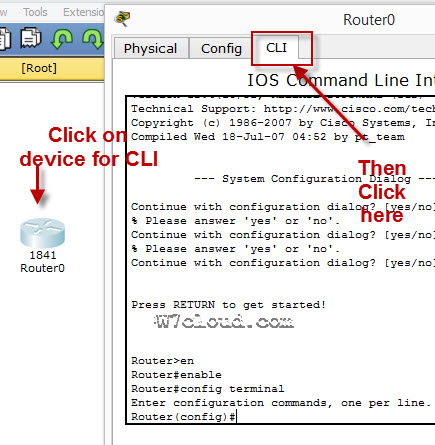
Packet Tracer Cisco CLI Commands list
Here is the detailed Cisco router configuration commands list, which can be implemented with packet tracer. Packet tracer is a network simulator used for configuring and creating the virtual cisco devices and network. There are also some other similar software but Cisco IOS output will be same on all simulators.
Related Article: PowerShell vs Command prompt
Cisco Router Configuration Step By Step
To configure any device in packet tracer you are required to open or access its CLI. You can do it by clicking any device and then navigating to CLI tab. Once you are at CLI you can perform all Cisco Commands here.
Cisco IOS supports numerous command modes which can be practice with packet tracer, followings are the main command modes of cisco CLI with specific commands to navigate from one mode to another. Also Check out some best cheap routers for real practice.
| Mode | Symbol | How to access this mode | Command for leaving this mode |
| User EXEC Mode | Router > | Default mode after booting. Press enter for accessing this. | Use exit command |
| Privileged EXEC mode | Router # | Use enable command from user exec mode for entering into this mode | exit |
| Global Configuration mode | Router(config)# | Use configure terminal command from privileged exec mode | Exit or Ctrl+Z for user EXEC mode |
| Interface Configuration | Router(config-if)# | Use interface <interface name+number> command from global configuration mode | Use exit command to return in global mode |
| ROMMON | ROMMON > | Enter reload command from privileged exec mode. Press CTRL + C key combination during the first 60 seconds of booting process. | Use exit command.
Watch a video of rommon mode |
IOS commands are not case sensitive it means that you can use them in uppercase, lowercase, or mixed case, but passwords are case sensitive. Therefore make sure you type it in correctly. In any mode, you can obtain a list of commands available on that mode by entering a question mark (?).
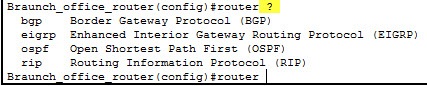
How to Change the Cisco Router name
You can change the cisco router name by using command hostname in global configuration mode.

How to set the Enable password:
You can set the password for protecting enable mode by following command: (Following command will set the password to cisco)
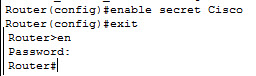
How to set the telnet password on Cisco:
You can access the cisco router remotely by VTY lines, these are the Virtual Terminal lines for access router, you can set password on these line by using the following commands:
Router(config)#line vty 0 4
Router(config-line)#password Cisco
Router(config-line)#no login
The above command will set the telnet password to “Cisco”.
How to set the IP address to Cisco interface:
You can set the IP address to any Cisco device interface by using the following commands:
Router(config)#interface <interface name&number>
Router(config-if)#ip address <IP address> <subnet mask>
How to enable a port or interface
Router(config-if)#no shut
Example:

How to check the IP address of all interfaces:
You can use the “show ip interface brief” command in Privileged EXEC mode for checking the IP address of all interface of Cisco device.
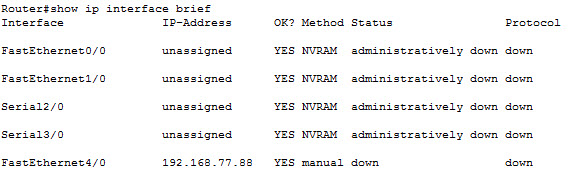
How to save the configurations:
You can use the following command for router configuration to Nvram for use at next boot up
Router#copy running-config startup-config
How to configure the access-list on Cisco:
You can configure the access-list on cisco by using following commands:
Router(config)#Access-list <number> <permit|deny> <ip> <mask>
Router(config-if)#ip access-group <number> <in|out>
OR
Router(config)#Access-list <number> <permit|deny> <protocol> <from ip and mask> <to ip and mask> <port number>
Router(config-if)#
Command Example:
Router(config)#access-list 2 deny 192.168.0.33 0.0.0.255
Router(config)#interface fastEthernet 4/0
Router(config-if)#ip access-group 2 in
How to configure the default route on Cisco:
Following command will set the default route to 10.10.10.101.
Router(config)# ip route 0.0.0.0 0.0.0.0 10.10.10.101
How to create a static route on Cisco router
Router(config-router)#ip route [destination_network] [mask] [next-hop_address
you can set a static route by using above command example is also given below:
Router(config-router)#ip route 192.132.23.1 255.255.255.0 10.10.10.1
—————————
——————-
| RIP Configuration Commands | |
| Commands | Details |
| Router(config)#Router rip | Enable RIP routing on router. |
| Router(config-router)#Network <network ip address>
Why we use RIP? |
Define the network which you want to advertise in RIP. E.g. Network 192.168.88.0 |
|
OSPF Configuration Commands |
|
| Router(config)#Router ospf <process-id> | Enable OSPF routing on router. Process-id is any number & must be same for all networks in AS. |
| Router(config-router)#Network < ip address> <wild cardmask>
Why we use OSPF? |
IP address is the IP of network which will be advertise in OSPF and wild card mask will represent the network bits. E.g. network 192.168.1.0 0.0.255.255 is equilent to 192.168.0.0/16 |
| EIGRP configuration Commands | |
| Router(config)#Router eigrp <AS number> | AS number is a number must be same for networks which are desired to connect with each other. E.g. Router eigrp 1 |
| Router(config-router)#Network < ip address> | Advertise network in EIGRP |
| Router(config-router)#no auto-summary
Why we use EIGRP? |
Disable auto summay |
banner motd <banner start identification> banner message <banner end identification>
Command Example:
banner motd #Unauthorized access to this device is prohibited!#
Above command with set the banner to “Unauthorized access to this device is prohibited”
Famous Show Commands in Privileged EXEC Mode
You can run all these command for checking different setting of Cisco device in privileged EXEC mode:
Show Version
Show running-config
Show Vlan
Show mac-address-table
Show clock
Show privilege
Show interface <interface name>
show ip route
Show controllers
show cdp neighbors
Show memory
Show protocols
Show startup-config
Show Flash
Show spanning-tree
Verifying Commands for Network Connectivity
You can use these commands to verify network connectivity for your router
router# enable
router# ping [ip-address | hostname]
Command Example:
router# ping 192.168.3.1
(A reply response from host 192.168.3.1 will verify the connectivity)
How to telnet any host:
telnet {ip-address | hostname}
e.g. router# telnet 192.168.3.1
Related Article: NMAP Commands Linux

Me Waqas Azam and I am a professional blogger & freelance writer. I also working in the IT industry for over 7 years. I am graduated in Computer Science and information technology.