
Драйвер для PCI-контроллера Simple Communications.
Данное программное обеспечение (ПО) входит в состав подсистемы Intel ME: Management Engine Interface (IMEI).
Для каждой серии чипсетов существуют соответствующие версии IMEI. В противном случае, в процессе инсталляции, операционная система выдаст оповещение: «Эта система не удовлетворяет минимальным требованиям для установки программного обеспечения».
Если нет уверенности в том, какая именно серия чипа установлена в материнской плате, рекомендуется воспользоваться утилитой Intel Driver & Support Assistant (размер файла: 13.2 Мб.).
Доступны драйвера следующих чипсетов для настольных систем (для большей совместимости в некоторых архивах содержатся несколько версий ПО):
- системы основанные на 963/965 чипах. Версия: 2.1.22.1033. Размер файла: 1.28 Мб.
- 3-я серия. Версии: 3.0.30.1086 и 3.2.50.1059. Размер архива: 3.17 Мб.
- 4-я серия (Mobile 4 Series). Версия: 4.2.0.1008. Размер архива: 1.63 Мб.
- 4-я серия. Версии: 5.2.0.1002 и 5.2.20.1030. Размер архива: 3.21 Мб.
- 5-я серия. Версия: 6.1.0.1042. Размер файла: 5.64 Мб.
- 6-я серия. Версии: 8.1.0.1248 и 8.1.0.1252. Размер архива: 92 Мб.
- системы на чипах X79. Версии: 7.1.21.1134 (Windows 7/XP) и 8.1.10.1286 (Windows 8/8.1). Размер архива: 51.9 Мб.
- системы на чипах B75/Q77 и H77/Z75/Z77. Версии: 8.1.40.1416(5M) и 8.1.40.1416(1.5M). Размер архива: 112 Мб.
- системы на чипах B85/Q87 и H87/Z87. Совместимость с Windows 7/8. Версии: 9.0.5.1367(5M) и 9.0.5.1367(1.5M). Размер архива: 109 Мб.
- системы на чипах B85/Q87 и H87/Z87. Совместимость с Windows 8.1. Версии: 9.5.15.1730(5M) и 9.5.15.1730(1.5M). Размер архива: 124 Мб.
- IMEI версии 11.0.0.1173 совместимый с Windows 10/8/7/XP. Размер архива: 94.1 Мб.
Разрядность системы значения не имеет (32/64 бита).
Поиск по ID
PCI-контроллер Simple Communications Drivers v.11.0.0.1173 Windows XP / Vista / 7 / 8 / 8.1 / 10 32-64 bits
Подробнее о пакете драйверов:Тип: драйвер |
PCI-контроллер Simple Communications / Intel MEI. Характеристики драйвера
Драйверы чипсета для PCI-контроллера Simple Communications от компании Intel, которое входит в состав подсистемы MEI: Management Engine Interface. Предназначены для установки на Windows XP, Windows Vista, Windows 7, Windows 8, Windows 8.1 и Windows 10 32-64 бита.
Management Engine на платах Intel обеспечивает температурный контроль для настольных компьютеров. И именно для взаимодействия драйверов приложений с хост-системой материнской платы используется драйвер Intel ME Interface
Для каждой серии чипсетов существуют соответствующие версии MEI. В противном случае, в процессе инсталляции, операционная система выдаст оповещение: «Эта система не удовлетворяет минимальным требованиям для установки программного обеспечения».
Если нет уверенности в том, какая именно серия чипа установлена в материнской плате, рекомендуется воспользоваться утилитой Intel Driver & Support Assistant.
Теги: Intel PCI-контроллер Simple Communications, Intel Management Engine Interface
Внимание! Перед установкой драйвера PCI-контроллер Simple Communications / Intel MEI рекомендутся удалить её старую версию. Удаление драйвера особенно необходимо — при замене оборудования или перед установкой новых версий драйверов для видеокарт. Узнать об этом подробнее можно в разделе FAQ.
Скриншот файлов архива

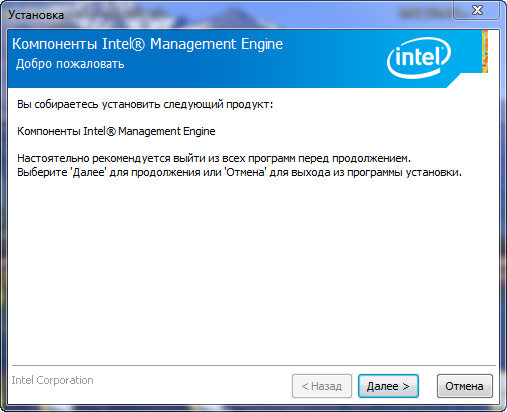
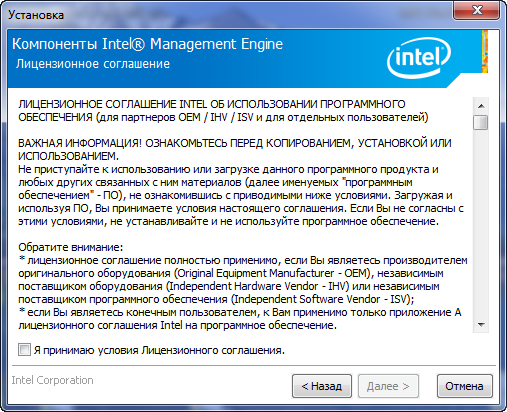
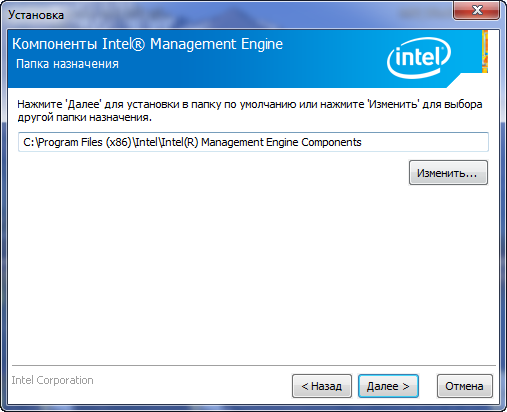
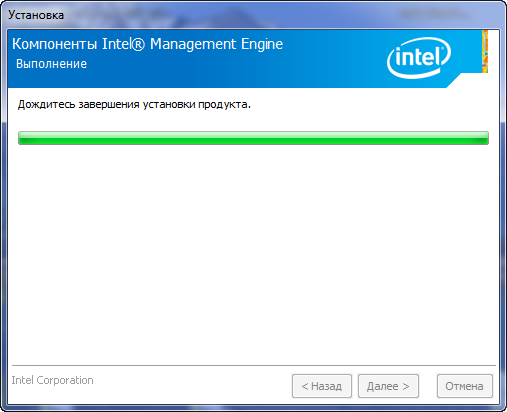
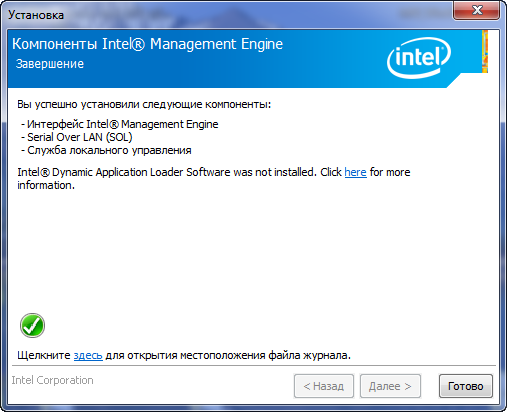
Скриншоты с установкой PCI-контроллер Simple Communications / Intel MEI
Файлы для скачивания (информация)
Поддерживаемые устройства (ID оборудований):
| PCI\VEN_8086&DEV_1C3A | Intel Corporation 6 Series/C200 Series Chipset Family MEI Controller #1 |
| PCI\VEN_8086&DEV_1C3D | Intel Corporation 6 Series/C200 Series Chipset Family KT Controller |
| PCI\VEN_8086&DEV_1CBA | Intel Active Management Technology — SOL |
| PCI\VEN_8086&DEV_1CBD | Intel Active Management Technology — SOL |
| PCI\VEN_8086&DEV_1D3A | Intel Corporation C600/X79 series chipset MEI Controller #1 |
| PCI\VEN_8086&DEV_1D3D | Intel Corporation C600/X79 series chipset KT Controller |
| PCI\VEN_8086&DEV_1DBA | Intel Management Engine Interface |
| PCI\VEN_8086&DEV_1DBD | Intel Active Management Technology — SOL |
| PCI\VEN_8086&DEV_1E3A | Intel Corporation 7 Series/C210 Series Chipset Family MEI Controller #1 |
| PCI\VEN_8086&DEV_1E3D | Intel Corporation 7 Series/C210 Series Chipset Family KT Controller |
| PCI\VEN_8086&DEV_28B4 | Intel Management Engine Interface |
| PCI\VEN_8086&DEV_28C4 | Intel Management Engine Interface |
| PCI\VEN_8086&DEV_28D4 | Intel Management Engine Interface |
| PCI\VEN_8086&DEV_28E4 | Intel Management Engine Interface |
| PCI\VEN_8086&DEV_28F4 | Intel Management Engine Interface |
| PCI\VEN_8086&DEV_2974 | Intel Corporation 82946GZ/GL HECI Controller |
| PCI\VEN_8086&DEV_2984 | Intel Corporation 82G35 Express HECI Controller |
| PCI\VEN_8086&DEV_2994 | Intel Corporation 82Q963/Q965 HECI Controller |
| PCI\VEN_8086&DEV_29A4 | Intel Corporation 82P965/G965 HECI Controller |
| PCI\VEN_8086&DEV_29B4 | Intel Corporation 82Q35 Express MEI Controller |
| PCI\VEN_8086&DEV_29C4 | Intel Corporation 82G33/G31/P35/P31 Express MEI Controller |
| PCI\VEN_8086&DEV_29D4 | Intel Corporation 82Q33 Express MEI Controller |
| PCI\VEN_8086&DEV_29E4 | Intel Corporation 82X38/X48 Express MEI Controller |
| PCI\VEN_8086&DEV_29F4 | Intel Corporation 3200/3210 Chipset MEI Controller |
| PCI\VEN_8086&DEV_2A44 | Intel Corporation Mobile 4 Series Chipset MEI Controller |
| PCI\VEN_8086&DEV_2A54 | Intel Management Engine Interface |
| PCI\VEN_8086&DEV_2A64 | Intel Management Engine Interface |
| PCI\VEN_8086&DEV_2A74 | Intel Management Engine Interface |
| PCI\VEN_8086&DEV_2E04 | Intel Corporation 4 Series Chipset HECI Controller |
| PCI\VEN_8086&DEV_2E14 | Intel Corporation 4 Series Chipset HECI Controller |
| PCI\VEN_8086&DEV_2E24 | Intel Corporation 4 Series Chipset HECI Controller |
| PCI\VEN_8086&DEV_2E34 | Intel Corporation 4 Series Chipset HECI Controller |
| PCI\VEN_8086&DEV_2E44 | Intel Corporation 4 Series Chipset HECI Controller |
| PCI\VEN_8086&DEV_2E94 | Intel Corporation 4 Series Chipset HECI Controller |
| PCI\VEN_8086&DEV_3B64 | Intel Corporation 5 Series/3400 Series Chipset HECI Controller |
| PCI\VEN_8086&DEV_3B67 | Intel Corporation 5 Series/3400 Series Chipset KT Controller |
| PCI\VEN_8086&DEV_8C3A | Intel Corporation 8 Series/C220 Series Chipset Family MEI Controller #1 |
| PCI\VEN_8086&DEV_8C3D | Intel Corporation 8 Series/C220 Series Chipset Family KT Controller |
| PCI\VEN_8086&DEV_8CBA | Intel Corporation 9 Series Chipset Family ME Interface #1 |
| PCI\VEN_8086&DEV_8D3A | Intel Corporation C610/X99 series chipset MEI Controller #1 |
| PCI\VEN_8086&DEV_8D3D | Intel Corporation C610/X99 series chipset KT Controller |
| PCI\VEN_8086&DEV_9C3A | Intel Corporation 8 Series HECI #0 |
| PCI\VEN_8086&DEV_9C3D | Intel Corporation 8 Series HECI KT |
| PCI\VEN_8086&DEV_9CBA | Intel Corporation Wildcat Point-LP MEI Controller #1 |
| PCI\VEN_8086&DEV_9CBD | Intel Corporation Wildcat Point-LP KT Controller |
| PCI\VEN_8086&DEV_9D3A | Intel Corporation Sunrise Point-LP CSME HECI #1 |
| PCI\VEN_8086&DEV_9D3D | Intel Active Management Technology — SOL |
| PCI\VEN_8086&DEV_A13A | Intel Corporation Sunrise Point-H CSME HECI #1 |
| PCI\VEN_8086&DEV_A13D | Intel Corporation Sunrise Point-H KT Redirection |
Другие драйверы от Intel
Сайт не содержит материалов, защищенных авторскими правами. Все файлы взяты из открытых источников.
© 2012-2023 DriversLab | Каталог драйверов, новые драйвера для ПК, скачать бесплатно для Windows
kamtizis@mail.ru
Страница сгенерирована за 0.063779 секунд

-
Главная -
Драйверы
-
Чипсеты
-
Чипсеты PCI
- PCI Simple Communications Controller
-
PCI Simple Communications Controller
Производитель:
Advanced Micro Devices Inc
Версия:
1.2.0.121
(17 апр 2023)
Файл *.inf:
oem66.inf
Windows Vista
,
7
,
8
,
8.1
,
10/11
В каталоге нет драйверов для PCI Simple Communications Controller под Windows.
Скачайте DriverHub для автоматического подбора драйвера.
Драйверы для PCI Simple Communications Controller собраны с официальных сайтов компаний-производителей и других проверенных источников.
Официальные пакеты драйверов помогут исправить ошибки и неполадки в работе PCI Simple Communications Controller (чипсеты).
Скачать последние версии драйверов на PCI Simple Communications Controller для компьютеров и ноутбуков на Windows.
Версия: 1.3.10.2240 для Windows 7, 8, 10 и 11
Бесплатное ПО
В комплекте идет опциональное ПО
- Yandex Browser
- Opera Browser
- Avast Free Antivirus
- World of Tanks
- World of Warships

Драйверы для PCI-контроллера Simple Communications Windows 8-10
Драйверы для PCI-контроллера Simple Communications Windows 8-10 скачать бесплатно для windows на русском
|
2.46 (132 голосов) |
Диски и Файлы Драйвер PCI Драйверы для PCI-контроллера Simple Communications Windows 8-10
|

Скачайте Драйверы для PCI-контроллера Simple Communications Windows 8-10 бесплатно
| Версия | Платформа | Язык | Размер | Формат | Загрузка |
|---|---|---|---|---|---|
|
Драйвер PCI контроллер шифрации ⁄ дешифрации |
Windows |
Русский | 232MB | .zip |
Скачать бесплатно |
|
Драйверы для PCI-контроллера Simple Communications Windows 8-10 |
Windows | Русский | 670MB | .zip |
Скачать бесплатно |
|
Драйверы для PCI-контроллера Simple Communications Windows 7 |
Windows | Русский | 190MB | .zip |
Скачать бесплатно |
|
Драйверы PCI Bus |
Windows | Русский | 12MB | .zip |
Скачать бесплатно |
|
Драйвер PCI последняя версия |
Windows | Русский | 243MB | .zip |
Скачать бесплатно |
|
Драйвер PCI русская версия |
Windows | Русский | 251MB | .zip |
Скачать бесплатно |
|
Драйвер PCI x64 |
Windows | Русский | 248MB | .zip |
Скачать бесплатно |
|
Драйвер PCI x32 |
Windows | Русский | 234MB | .zip |
Скачать бесплатно |
|
Драйвер PCI x86 |
Windows | Русский | 241MB | .zip |
Скачать бесплатно |
|
Драйвер PCI 2022 |
Windows | Русский | 238MB | .zip |
Скачать бесплатно |
|
Драйвер PCI 2021 |
Windows | Русский | 246MB | .zip |
Скачать бесплатно |
|
Драйвер PCI 2020 |
Windows | Русский | 254MB | .zip |
Скачать бесплатно |
| * скачайте бесплатно Драйвер PCI для Windows, файл проверен! |
Обзор Драйвер PCI
PCI – шина (разъем) на материнской плате. Служит для подключения периферийных устройств: сетевых карт, модемов, звуковых карт и т. д.
Читать Далее »
Скриншоты
|
|
|
|
|

Похожие программы
 CCleaner — инструмент для очистки и оптимизации операционных систем Windows
 WinRAR — самый популярный архиватор
 DAEMON Tools
 DjVu reader
 UltraISO
 Unlocker
 AdwCleaner — софт для выявления и удаления нежелательных программ.
 Notepad++
 WinRAR 64 bit
 Recuva — программа для восстановления удаленных файлов
 SpeedFan
 Revo Uninstaller
 Advanced SystemCare — оптимизации и очистка системы
 Alcohol 120%
 Adobe Acrobat
 ArtMoney
 SHAREit — обменивайтесь файлами и папками между устройствами, по Wi-Fi
 ABBYY FineReader — программа для распознавания текста со сканов
 Nero
Nero Andy
Andy Foxit Reader
 IObit Uninstaller — программа для удаления программ, папок, плагинов браузеров
 IObit Malware Fighter — для удаления вредоносных программ – троянов, кейлоггеров
 Mobogenie
 Nokia PC Suite
 BlueStacks — программа для запуска android приложение на windows
 360 Total Security — условно-бесплатное антивирусное программное обеспечение
 Wise Care 365 Pro — для оптимизации и очистки компьютеров
 Razer Cortex — выгрузка необязательных процессов и общая оптимизации ресурсов
 7-Zip — бесплатный архиватор для windows
 Victoria HDD — программа для для тестирования жестких дисков
 CPU-Z
CPU-Z Total Commander — менеджер файлов с двухпанельным графическим интерфейсом
 Driver Booster Free — программа для поиска и установки новых драйверов
 AIDA64
 Acronis Disk Director — пакет инструментов для работы с жесткими дисками компьютера
 MSI Afterburner — для детального мониторинга, настройки и разгона видеокарты
 DriverPack Solution — для автоматической установки и обновления драйверов
 Cheat Engine
 Clean Master — очистка жесткого диска и оптимизация компьютера в целом
 VirtualBox — создание вирутальных машин
 Reg Organizer — программное обеспечение для оптимизации и очистки компьютера
 Nox App Player — программа для запуска андроид игр и приложений на windows
 R-Studio — программа для восстановления удаленных данных
 Auslogics BoostSpeed
 Uninstall Tool — утилита предназначенная для полного удаления приложений
 Acronis True Image
 Razer Game Booster — программа для отключения неиспользуемых процессов
 Punto Switcher
 HDD Regenerator — программа для восстановления жестких дисков
 Kerish Doctor
 ABBYY Lingvo
 Speccy — утилита для диагностики состояния ПО компьютера
 Xpadder
 Adobe Dreamweaver
 Driver Genius — сканирования и обновление драйверов на компьютере
 Glary Utilities
 CheMax
 Mem Reduct
 FBReader
 Cool Reader
 Samsung Kies — подключение телефонов и смартфонов компании Samsung к ПК
 Eraser — приложение для безвозвратного удаления данных
 TuneUp Utilities — пакет инструментов для оптимизации и настройки компьютеров
 Smart Defrag — программа для дефрагментации жестких дисков
 Hetman Partition Recovery — восстановление поврежденных и удалённых данных
 TestDisk — программа для восстановления дисков и файлов после сбоев
 Nero Burning ROM
 ImgBurn
 FB2 Reader
 AVG Internet Security — антивирус для обеспечения безопасности при работе в сети
 AVG Antivirus — антивирус для защиты персональных компьютеров
 EasyBCD
 Defraggler — утилита для дефрагментации жестких дисков.
 STDU Viewer
 Everest — диагностическая утилита для проверки работоспособности компьютера
 Dr.Web CureIt! — бесплатная утилита для лечения компьютера от вредоносного ПО
 Adobe Reader
 Kaspersky Free — бесплатная версия антивируса от лаборатории Касперского
 NOD32 — хороший антивирус для компьютера
 iTunes — программа для синхронизации между мобильными устройствами Apple
 LibreOffice
 PDF Reader
 Rufus
Rufus Arduino
 Visual Studio
 Kingo Root
 Android Studio
 Scratch
 Firebird
 Eclipse
 HWMonitor
 Сalibre
 Core Temp
 Ashampoo Burning Studio
 Display Driver Uninstaller — для удаления устаревших драйверов видеокарт
 FAR Manager
 CrystalDiskInfo — диагностическая утилита для проверки жестких дисков
 HDD Low Level Format Tool — утилита, предназначенная для форматирования жестких дисков
 Ускоритель компьютера — оптимизация операционной системы Windows
 Classic Shell
 WinThruster — оптимизация операционных систем семейства Windows
 Avast Free Antivirus — бесплатный Аваст антивирус для компьютера
 Mcafee — антивирусная программа, для защиты компьютера от внешних угроз
 Intel Driver
 ASUS Update — утилита, предназначенная для обновления BIOS на компьютере
 CPU Control
 Microsoft Security Essentials — антивирус для защищиты операционной системы
 ActiveSync
 Minitool Partition Wizard — утилита для работы с HDD
 BlueSoleil
 Malwarebytes Anti-Malware — частично бесплатная антивирусная утилита
 MHDD — диагностика и исправление ошибок на жестких дисках
 GetDataBack — приложение которое предназначено для восстановления данных
 RivaTuner
 HDDScan — утилита для анализа и тестирования физических носителей
 HitmanPro
 BitDefender
 MultiBoot — программа для восстановления загрузочных записей windows
 Trend Micro HijackThis
 VMWare Workstation
 Sublime Text
 Media Creation Tool
 CrystalDiskMark — приложение для анализа состояния жестких дисков
 HP LaserJet Драйвер
 NVIDIA Драйвер
 Canon Драйвер
 Драйвер звуковой карты
 Сетевой драйвер
 ASUS Драйвера
 Драйвер PCI
 AMD драйвера
 Драйвера для ноутбука
 Драйвера Samsung
 Драйвера Intel
 Драйвера Epson
 Драйвера MFP
 WinZip
 Аудио | Видео программы
 Графические программы
 Microsoft Office
 Интернет программы
 Диски и Файлы
Table of Contents
How to Update the PCI Simple Communications Controller Driver for Windows 7?
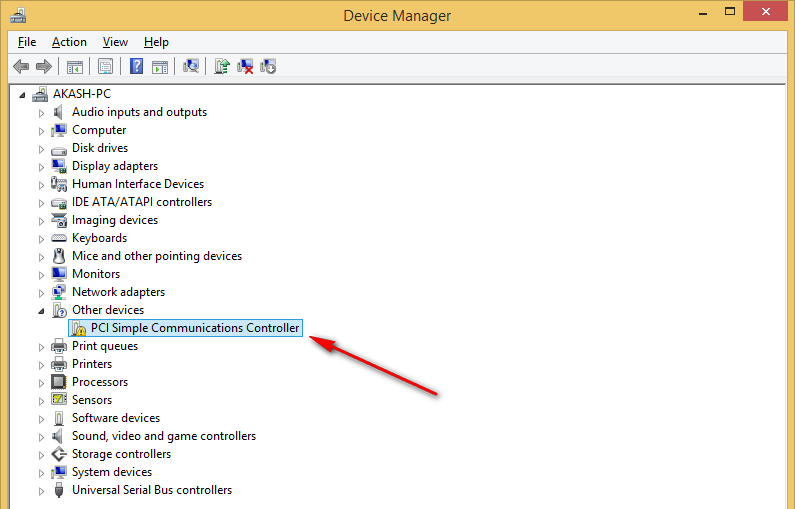
If the PCI Simple Communications Controller driver for Windows 7 shows a yellow exclamation mark in Device Manager, this means that the drivers need to be updated. You can update the drivers manually or automatically.
Automatically updating the driver is the best option. It can save a lot of time and effort. All you need to do is to download a reliable driver update software.
Fix 1: Update the Driver:
If your computer has a yellow exclamation mark in Device Manager, this means that the PCI Simple Communications Controller driver is outdated or missing. This error can be fixed easily and quickly by updating the driver. To do this, open the Device Manager, right-click on the device, and click Update driver software.
Then, Windows will search your computer and the Internet for updated drivers. If it finds one, it will download and install the new driver automatically.
Alternatively, you can try using websites like PCI Lookup to find the driver manually. These sites will provide the hardware ids of your device, which you can then use to search for it online.
Another option is to use a professional driver update tool, such as Bit Driver Updater. This tool will scan your computer, detect the missing or outdated PCI Simple Communications Controller driver, and then update it in a single click. It’s also backed by 24*7 technical support and a 60-day money-back guarantee.
Fix 2: Update the Software:
The driver for the PCI Simple Communications Controller is an important piece of software on a computer that allows it to control the PCI-connected devices inserted into it. It also manages these devices’ actions and how software interacts with them. It is therefore crucial to keep the driver up-to-date.
You can update the drivers manually through Windows’ Device Manager or automatically through a trusted driver update tool. The best option is to use a tool like Bit Driver Updater, which will scan your system for outdated drivers and automatically update them. This way, you can get the best performance out of your PC.
You can also update the drivers for the PCI Simple Communications Controller by visiting the manufacturer’s website and downloading the latest version of the driver. Make sure you download the correct driver for your specific hardware model and operating system. You can search for the right driver using the hardware id and your Windows OS version.
Fix 3: Check the Hardware Ids:
Suppose you see a yellow exclamation mark next to PCI Simple Communications Controller or other device drivers in the Other Devices list in the Device Manager. In that case, it indicates that there are issues with these devices. You can resolve the issue by manually updating the driver, or by downloading a new one from your manufacturer’s website.
You can also check the hardware ids of your device to find a compatible driver online. Open the Device Manager, locate the device, and right-click it. Select “Properties,” then click the Details tab. Look for the longest hardware id (e.g., DEV_xxxx&SUBSYS_xxxxxxxx), which is unique to the model of the device from that vendor.
Alternatively, you can use a professional driver updater to get the latest drivers for your device automatically. This tool will scan your computer for outdated drivers, and then update them with just a click. It offers 24/7 customer support and is free to try. You can also purchase a full version to enjoy its complete functionality and 60-day money-back guarantee.
Fix 4: Check the Motherboard Driver Disc:
The way a computer works as a system involves a mix of hardware devices and software. Each of these devices must have the proper driver installed for it to function properly. The PCI simple communications controller is one such device that requires a driver in order to work. The PCI driver is a piece of software that manages the different hardware devices on your computer.
To update the driver for this device, go to the Device Manager and expand the “Other Devices” section. Right-click on the device and click “Update driver software”.
You can also download the drivers for this device from its official website. However, this method is time-consuming and can be difficult for beginners. Instead, we recommend downloading a tool such as Bit Driver Updater to update your drivers automatically. This program can scan your computer for outdated drivers and download and install the latest versions in just a few clicks. Plus, it has 24*7 technical support and a 60-day complete money-back guarantee.